The design language of a fast multiplayer word game. A symmetric light/dark system where roles swap, two hues carry every meaning, and each screen is quiet around one thing — the letter tile.
01 Principles
Principles
Five beliefs, in priority order — when two conflict, the higher one wins. The mechanical choices under them aren't separate rules; they're these, made concrete. Written to be used in a critique, not admired on a wall.
The experience is the whole point
Judge every decision by how the round plays — never how it looks or how clever it is. Speed and clarity are the biggest levers inside the experience, but the small joys — a word landing, the trace snapping shut — are part of it too, and don't get traded away to shave milliseconds.
so "does this make the round better to play?" is the only question that settles an argument. Pretty, novel, and distinctive are all downstream of it.
Fast and clear, before anything on screen
The player is racing a clock: every read instant, every control obvious, nothing between them and the next word. When speed or legibility fights beauty, novelty, or personality, speed wins — every time.
so this governs the look, never the feel in 01 — a treatment that costs even a beat of legibility loses, however good it looks.
Calm does double duty — speed and feel
A quiet interface keeps fewer things between the player and their word, and gives the game a composed, premium calm. Low stimulation isn't restraint for its own sake; it's how Outword stays fast and feels good at once.
so a muted palette, one thing moving at a time, and nothing on screen competing with the board for the eye.
Craft is restraint; over-design is the failure
Craft here is precision, not richness — the truest colour, the tightest spacing, the cleanest state. The quickest way to be wrong is a flourish that's trying. If it looks "designed," cut it back.
so the strongest move is usually to remove something — new emphasis competes with existing emphasis, and more signal is rarely more clarity.
Unmistakably Outword — earned, never decorated
It reads as itself the instant you see it: the tile, the swipe-trace, the two grounds. Identity is the last thing to protect in a conflict — clarity always outranks it — but it's always present, and it comes from the mechanic, not from ornament.
so distinctiveness is a byproduct of the game's own shapes, never a treatment added to look unique.
How they show up
The recurring mechanical choices in this document — each one is a driver above, made concrete.
- The board is the hero; everything else stays quiet. One primary action per screen, controls in outline, and no decoration that pulls the eye off the letters.
- One hue, one meaning · one pill, one live value. Green is earned, rose is danger, plus one system hue for focus; a pill holds a single changing number, never a static label.
- Motion belongs to menus, not gameplay. Ambient movement on idle screens; the instant a round goes live, everything freezes.
- Two grounds, symmetric. Light and dark are one system with the roles swapped; every colour is a token, so a hardcoded value can't survive a mode flip.
02 Foundations
Color
Two grounds. The color that is the page in one mode is the ink in the other. The ground/ink pair is a true inversion; the softer tiers — soft, faint, lit — are hand-tuned per mode rather than blindly swapped, so each reads correctly.
Tokens are built in three tiers: a base reference (--dk-* / --lt-*) holding the only literal values; an active layer (--ground, --fg…) that components reference; and a mode swap on :root[data-mode="light"] that repoints the active layer. Flipping that one attribute is the whole mechanism — a hardcoded hex can't follow it, which is why it's forbidden.
fig.01 — the same two roles, grounds swapped
The two semantic hues
Green (--earned) and rose (--danger) are the only colors that carry meaning — and the only ones that don't invert. Each means exactly one thing. Green is never a selection colour: a word shown or traced on a board, and the pill that shows it, use the pressed-tile state. Shown in context, on the word pill they live on:
fig.02 — earned · danger · dup · neutral
Type on any semantic fill is always --ground — never white, never black. In dark mode --danger is a light rose, so white on it lands at ≈1.7:1 — unreadable — while --ground ink clears 8:1. Green is positive only; rose is negative only. If green ever also meant "selected," the system would be broken.
03 Foundations
Typography
Three families as tokens — display, body, and word — the same split this document is set in. Arial Black carries the loud moments; a system face carries the reading; the word face is the tiles.
Weights: 500, 600, 700, 800 — nothing else. Live numbers use tabular-nums. The eyebrow (uppercase, +2px, --fg-soft) is the recurring structural label — reuse it, don't invent section headers.
04 Foundations
Radius
Three radii carry the system. Reach past them only with a reason.
Also present: 8 (brand die), 10 (segmented), 18 (sheet top), 2 (rails). Prefer 12 / 999 / 14.
05 Foundations
Spacing
A 4px base grid. Common gaps: 8 / 12 / 16 / 20 / 24. The modal head is the reference rhythm — 20 above the title, 4 to the sub, 16 to the rule, 12 under.
06 Foundations
Motion
Motion in Outword has one job: make the game feel alive without slowing anyone down. It explains where something came from, confirms a tap, or celebrates something rare. A move that does none of those gets cut.
Principles
- Purpose first. Every move answers one question: where did that come from, did that work, or is this worth celebrating.
- Size it to the moment. Things that happen often stay small and quick. Only things that happen once get a story (see the moment map).
- The round is sacred. While a clock is running, only feedback moves: tile state and the word pill. No ambient motion and no celebration on the board.
- Physical, not magic. Things arrive from somewhere and leave to somewhere. Nothing pops out of nothing, and nothing stretches.
- Calm by default. Motion settles and stops. Attention is asked for once per visit, then the screen goes still.
Vocabulary
Seven moves cover everything that ships. New motion uses one of these before it invents anything. Press a move to replay it.
| Move | Curve | Duration · used for |
|---|---|---|
| feedback | linear | 70–80ms · tile state, button press. Feels instant; it only confirms. |
| pop | cubic-bezier(.3,1.4,.5,1) | 240–300ms · something small landing: the key dot, the crown, a badge. Starts at ×0.4–0.9, never from zero. |
| enter / move | cubic-bezier(.2,.8,.2,1) | 500–700ms · pieces travelling, toasts, rows, captions, sheets. |
| rise | cubic-bezier(.22,1,.36,1) | 700–820ms · podium columns sliding up out of a baseline mask. |
| exit / fall | cubic-bezier(.5,0,.75,0) | 520ms · things leaving, the crown dropping, the board falling away. |
| attention | ease-out | 900ms × 2 · a ring grows from the dot to ×2.6 and fades. Once per visit, then still. |
| kinetic text | enter curve | 460ms a word, 60ms apart, rising 10px out of a 4px blur. Sub line follows 300ms later. Stories only (the update reel). |
Ambient · the brand-mark trace runs a 5700ms cycle on menus only (see Brand mark) · mode cross-fade eases the ground over 0.5s · chevron 0.15s
The moment map
Copy turns into a check. "Saved". Never in the way.
The podium and crown, the update reel, welcome back. Confetti lives here only.
A wrong code turns the slots --danger. No shake.
A fresh phone asks "Played before?" Words do the work.
Rules
- Only feedback moves during a live round. Celebration, attention and ambient motion all wait for Home or results.
- Never scale from zero. Pops start at ×0.4–0.9. Things fade and grow in; they don't appear from a point.
- Grow with a mask, never a stretch. Anything with text, a radius or a border slides out of a clipping mask (
translateY(101%) → 0).scaleYon those is banned, because it squashes corners and type. - Enter slow, leave fast. Entries decelerate and exits accelerate. An exit is never longer than the entry it undoes.
- One move per area at a time. Groups stagger 40–60ms apart so the eye can follow. Two things never compete in one spot.
- Ask for attention once. A ring or dot animates on the first view of a visit (
sessionStorage), then holds still. Nothing loops forever except the brand mark on menus. - Confetti is earned, and it clears. Rare positive moments only, the full fall (4–6s), and it's gone before any button needs a tap.
- Errors don't shake. Colour plus plain words. Shaking reads as scolding, and kids use this too.
- Reading time is part of the motion. In a story, hold 3s after each caption lands before the next beat starts.
- Only transform and opacity. No animating width, height, top or box-shadow, so motion stays smooth on older phones.
- Reduced motion is a full design, not an off switch. See below.
Reduced motion
| Move | Under prefers-reduced-motion: reduce |
|---|---|
| feedback | Unchanged: colour changes are not motion |
| pop · enter · rise | The final frame, or a ≤150ms opacity fade where feedback is needed |
| exit | Removed instantly |
| attention | The dot shows with no ring. The cue is the dot, not the movement |
| confetti | None. The podium opens built, crown on |
| update reel | Opens on the recap close. Nothing it said is lost |
| brand mark | Static on its resting hook |
Turn reduced motion on and walk the flow. If any information only came across through movement (where something went, what's new), the still version has a bug.
07 Foundations
Brand mark
A filled disc with a 3×3 lattice, and a line that traces a legal board path across it — the disc is the leading O of "utword." SVG on a 0 0 100 100 viewBox; geometry locked to the approved reference.
fig.06 — the live mark, tracing legal board paths · disc --fg · dots --mark-dot · trace --ground
| Part | Spec |
|---|---|
| disc | cx/cy 50, r 34.2, fill --fg |
| lattice | 9 dots, r 3.15, --mark-dot, spaced by R_CELL 0.234 × diameter 68.4 |
| trace | polyline, --ground, width 3.9, round caps, pathLength=1 |
| motion | draw 1400 → hold 2800 → retract 1000 → pause 500 (5700ms), eased |
Legal traces
The trace only ever draws a real board path — cells that touch, edges or corners, and never the same one twice. It's the exact rule you swipe by in a round: a word is just a legal trace with letters on it.
The rule allows 10,256 legal paths of 3 to 9 cells. Drawing them at random throws the occasional awkward shape at logo size, so the mark instead rotates through a curated set (the four below, the game's MARK_PATHS, chosen to read cleanly), starting from the canonical hook (1·4·7·6·3), which is also the app icon and the still frame under reduced-motion.
the rotation set · the live mark above cycles these in order · hook leads and is canonical
Motion — the lattice holds, the trace moves
Each trace runs the same beat: draw 1400ms → hold 2800ms → retract 1000ms → pause 500ms — a 5700ms cycle, eased cubic in-out — then the next in the rotation. The nine dots never move; only the line does. It's the game's own swipe gesture, slowed to an ambient pace.
The instant a round starts, live=false and the mark freezes on its resting hook. Nothing moves while someone is racing the clock — ambient motion belongs to menus, not to the board, where it would only pull the eye off the tiles. It also pauses when scrolled off-screen (IntersectionObserver) and holds completely still under prefers-reduced-motion.
The NameGrid is the same primitive — as of v3.14.1 its letters recede, so its trace line stays visible while the game board's is hidden.
08 Components
Tiles
The heart of the UI; everything else is quiet around it. Square by construction, radius 14, 2.5px border, box-sizing border-box so a state change never shifts the grid.
lit = --select + --select-stroke + --select-ink
resting is a solid fill — an outline read as "unfinished"
On the game board the trace line is hidden — filled tiles carry the word, feedback lives in the pill. The name board is the sole exception: its letters recede, so the line earns its place. Tiles are the one control with no press-dip; it would fight the trace.
On review boards (daily board, game results, practice results), tapping a word to show it lights its path in the same lit state as tracing in a round: --select fill, --select-stroke outline, --select-ink letter, with the normal --trace line. That includes "Longest on board". Showing a word earns nothing, so the path is never green.
Name board
On the home screen your name is spelled across a mini board — the reward for typing a real name. It's the same tile, the same selected treatment, and the same polyline as gameplay, so it reads as a board rather than decoration. The name sits on a random legal path (adjacent cells, no reuse); the rest is filler. The name letters wear the selected/recede treatment (--select fill + --select-stroke) while filler stays the bright resting tile — the inverse emphasis of gameplay, which is exactly why the trace line shows here.
5 columns · tile radius 9 · trace --trace, width 2.4, 50% · draws at 190ms/letter
The board is 5 wide, 2 rows up to 10 letters and 3 beyond. A self-avoiding walk places the name; leftover cells take filler from a fixed set. Each open types the name on — 260ms in, then a tile every 190ms with the trace growing behind it — and every tap re-lays a fresh random arrangement.
10 Components
Toggle
Two toggles. The segmented control switches between named options — the on segment fills with --fg, so the choice reads as loud as a primary. The mode toggle is a single icon button that flips the ground.
on = --fg fill · --ground ink · 44px · radius 10
off segments are --fg-soft on transparent
home-icon-btn · 44×44 · a half-filled disc reads as "appearance"
one glyph, not a sun/moon — only the ground flips (0.5s cross-fade)
The segmented control has no empty state — one option is always on. It's a choice between peers, not an on/off switch; there is no sliding-thumb switch in the system, and adding one would introduce a second selection metaphor competing with the tile's lit state.
11 Components
Pills
Radius 999, reserved for a single live value — the clock, the score, the word being traced. Not for recaps or badges; those use weight and ink.
fig.10 — timer · urgent (rose, ground ink) · score
The word pill's resting state is boxless, so touching a tile has nothing to collapse; min-height holds the slot. Arriving fades grey→green; leaving is instant (.empty is transition:none) so no green blob lingers after the word is gone.
Tappable word pills
resting · active (its word is showing on the board) — the pill flips exactly like a pressed tile · never green
12 Components
Cards & sheets
Exactly three elevation levels — depth comes from the tile's inset lip, not stacked shadows: --ground (page), --raise (on it), --lit (a tile in the trace).
rank · name · longest pill · points · tap to expand → per-word points
green takes fill AND border — solid pills match; tinted surfaces keep a solid --earned stroke
An earned (green) or danger (rose) element takes the hue on both fill and border — never a coloured fill left with a neutral --rule stroke. Solid states match border to fill (--earned on --earned); tinted surfaces pair an --earned-wash/--earned-card-bg fill with a solid --earned-card-border stroke, so the edge still reads green.
Bottom sheet
The app's modal rises from the bottom — that's where thumbs already are. The scrim dismisses; the ✕ is for people who don't know that. Every gap in the head is a multiple of 4: 20 above the title, 4 to the sub, 16 to the rule, 12 under.
Create game
Set it up, then read the code out to everyone.
| Part | Spec |
|---|---|
| scrim | fixed inset 0, rgba(6,16,32,.72), fade-in 160ms |
| sheet | max-width 520, bg --ground, 1px --rule, radius 18 18 0 0, shadow 0 -8px 40px --shadow, max-height 88vh (less the keyboard while one is up) |
| rise | sheet-up 220ms cubic-bezier(.22,1,.36,1) — none under reduced-motion |
| head | title 800/17, sub 500/12.5, close 44×44 outline |
| foot | border-top --rule, padding respects env(safe-area-inset-bottom) |
| no foot | the body's bottom adds env(safe-area-inset-bottom), so its last line clears the home indicator (3.25.4) |
| keyboard | while one is up the sheet sits on it: scrim padding-bottom var(--kb), from the visual viewport; the inset drops out (3.25.4) |
fig.11 — scrim dismisses · sheet rises from the thumb line · 18px top radius only
13 Components
Fields
One field style. The name field is the default; the join field is the same field with a .code modifier — centered, uppercase, +6px — for typing a host's 4-letter code.
name + join input · height 52 · radius 12 · fill --raise · code +6px, centered
same tokens, swapped ground
That .code field is only for entering a code to join a game. The room's own code — the one the host reads out — is never in a field. It's open display text: --font-display, 54px, +14px.
States
Validation runs on submit, never while typing. The field itself doesn't change on error — the message does the work: names show an inline .field-err, the join code shows an .err banner. Fields never disable.
Names need at least 2 letters.
Pick a different name.
default · focus (--gold ring) · too short (<2) · blocked (profanity). Also: "Use at least two different letters."
.code fieldGet the 4-letter code from your host.
uppercase · +6px · centered · exactly 4 letters. 4 but unknown → "No game found with that code."
The field checks above are for names and codes. A traced word is validated in the word pill (see Pills): under the minimum length (3, climbing to 4/5 in Survival) reads short; not-a-word or a blocklisted word reads bad; already-found reads dup. Same profanity BAD_SET keeps bad words off the board and the leaderboard.
14 Components
Compete cards
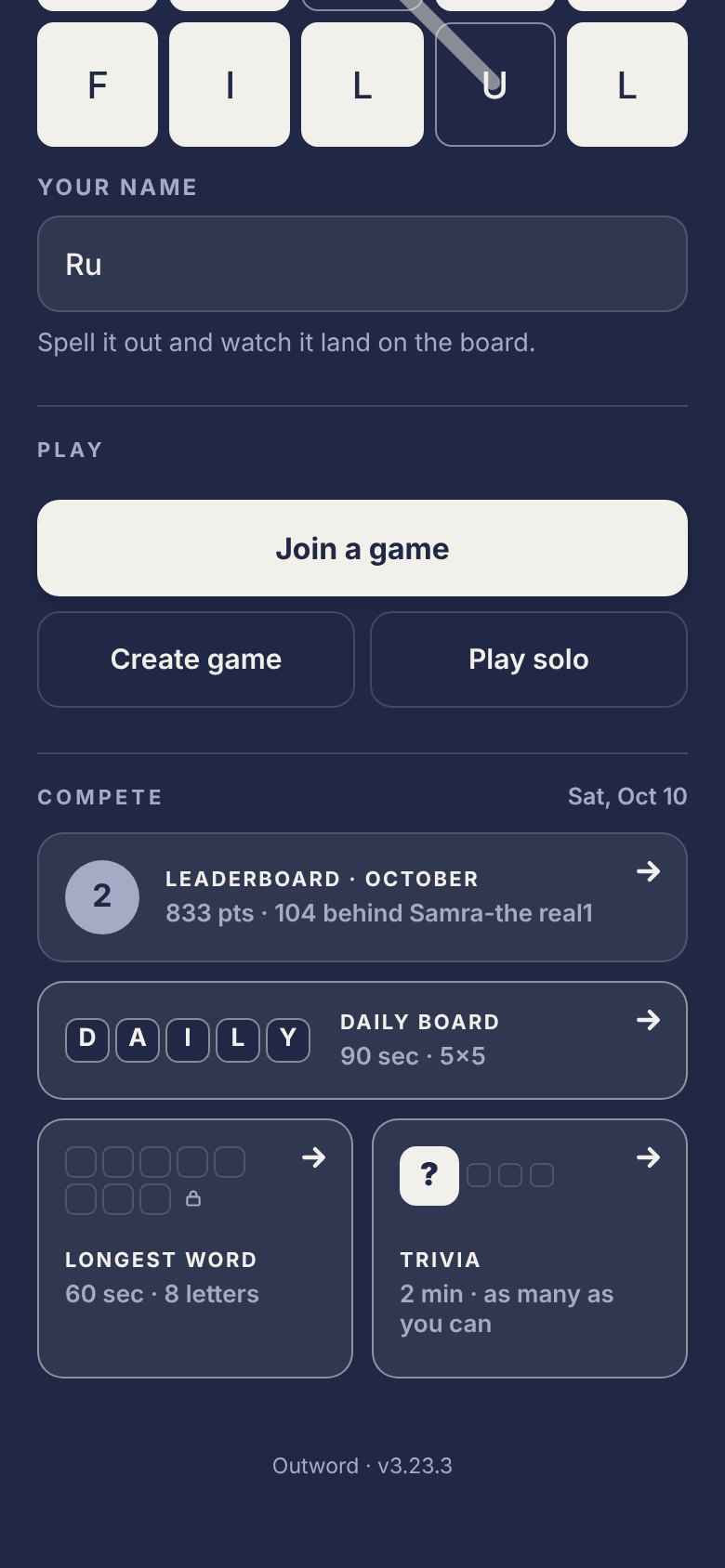
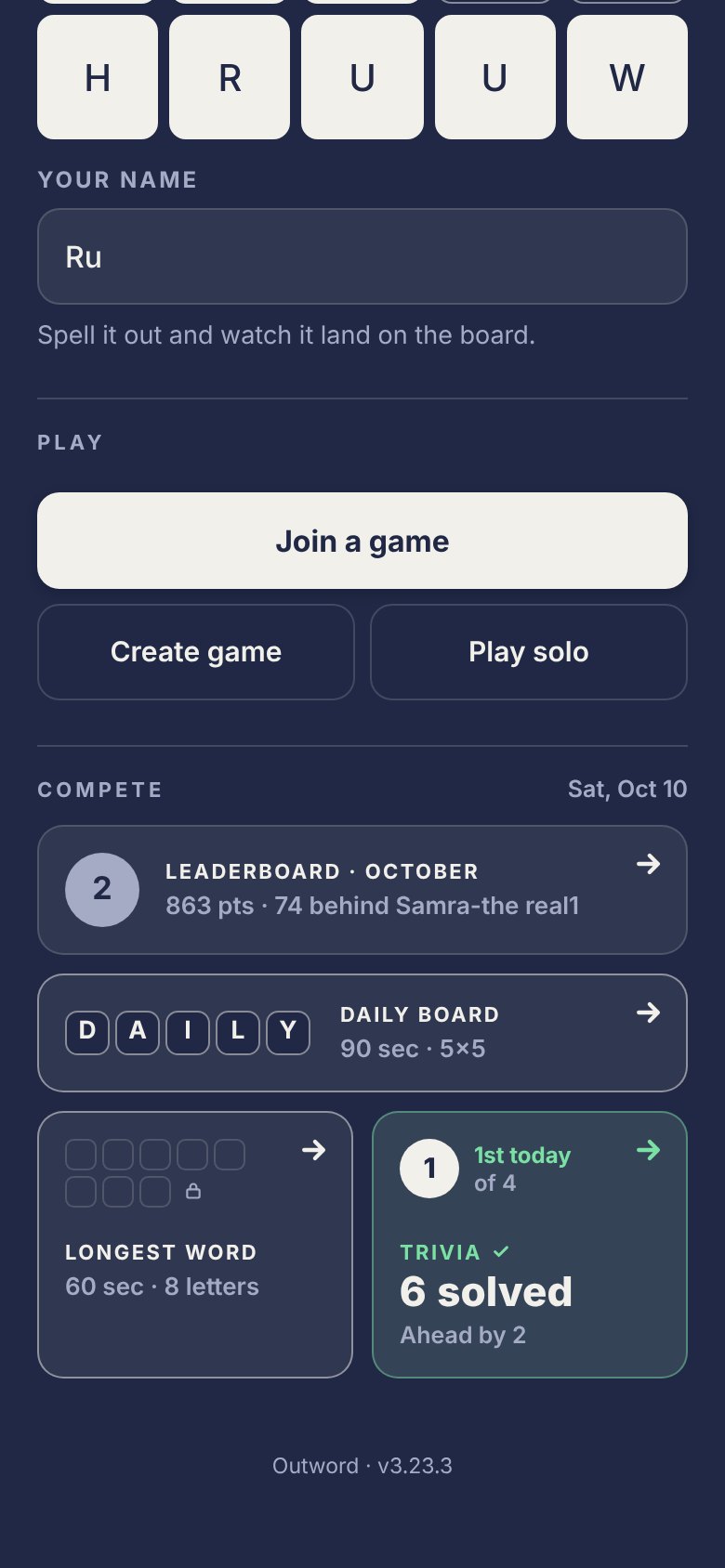
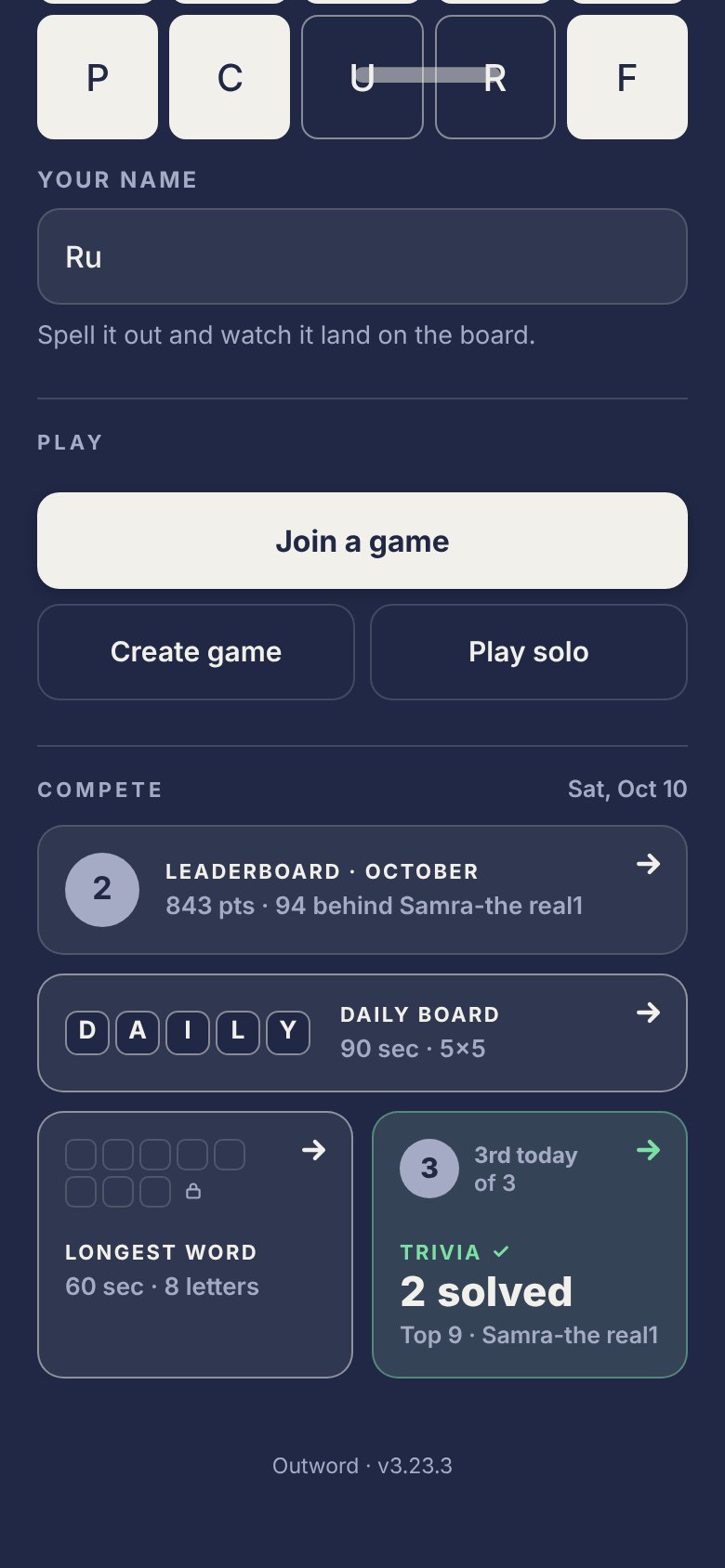
Home's Compete section is a small bento: the monthly leaderboard row, the Daily board (full width), then Longest word and Trivia side by side. Every card is one tap target with its arrow tucked in the top-right corner. A card turns green once you've played that game today — green means earned, so it never shows before.
| Part | Spec |
|---|---|
| .cc-card | radius 14 · padding 14 · --tray-raise fill · 1px border. play: border --select-stroke. done: fill = 7% --ok-green over --tray-raise, border = 45% --ok-green, arrow turns green |
| arrow | 24×24, absolute top 8 / right 8, close to the corner. Rows reserve 36px on the right, tall cards 22px under the top row |
| .cc-row | leaderboard: 40px rank circle · eyebrow "Leaderboard · October" · meta "833 pts · 104 behind name" (number first) |
| .cc-wide | Daily board: DAILY in selected tiles (24px) · "Daily board / 90 sec · 5×5" → done: eyebrow "Daily ✓" + big "46 pts" |
| .cc-pair / .cc-tall | two columns, gap 10 · min-height 140 · top row (cover + arrow, min 40px) · text pinned to the bottom |
| eyebrow / big / meta | .cc-eb 700 11px, tracking 1.2px, uppercase (green + check when done) · .cc-big 800 22px, tabular · .cc-meta 600 13px --paper-dim |
| word tiles | .cc-t size var (17px default), radius 28% of size · selected = --select / --select-stroke / --select-ink · empty = 1.5px --tray-line outline · max 5 per line, then wrap |
Longest word card
Before: empty slots for the board's longest word (5 + 4) with a small lock, "Longest word / 60 sec · 9 letters". After: your word in selected tiles in the slots, "Longest ✓ / 6 of 9". The lock opens (green) only when you found the longest word possible; white when someone else did.
Trivia card · option K (3.23.2)
Before: the ? tile, "Trivia", "2 min · as many as you can" — nothing else, so it never reads text-heavy. After: your place today as a rank circle (circle = rank) with "2nd today / of 14", your count, and one quiet line. The number always leads, so a long name only ever truncates itself.
| State | Line |
|---|---|
| behind | "Top 7 · Samra-the real1" |
| tied | "Tied with Alexandria-Kate" (+n when more than one) · 1st |
| leading | "Ahead by 2" · or "Ahead on skips" when the count is equal |
| only player | no line |
| .cc-rank | 32px circle (1st uses .place-1) · "1st today" 700 12px, green when 1st · "of N" 600 --paper-dim |
| .cc-trline | 600 12.5px --paper-dim · one line, ellipsis · stretches the card width |
| never | a lock, "unlocked", empty tiles standing for a count, or the answer |
15 Patterns
System states
Outword is realtime and multiplayer, so waiting and failure are core surfaces, not corners. Every state below ships in the app — the copy is verbatim, and it's where the Voice principles actually earn their keep.
the primary swaps its label and disables while Firebase is pending (create / join)
No connection. Playing solo works anyway — the board and the dictionary are on your phone.
multiplayer actions disable; solo stays live — board and dictionary are on-device
Room codes are 4 letters.
No game found with that code. Double-check the letters with your host, or pick one from Public games below.
That room is full. 12 players max.
That game already started. Ask the host for a new round.
specific, actionable, never apologetic — always naming the next move
Nobody's scored yet this month
Nothing open right now. Ask your host for a code, or start your own game.
Looking for games…
leaderboard · public list (empty) · public list (loading) — each points to an action
Every waiting state disables and relabels rather than spinning a generic loader; every error is specific and names the fix; every empty state invites the next step instead of setting a mood. Nothing in this product is allowed to fail silently or block the one thing that always works — solo play.
16 Patterns
Help & recovery
A swipeable help deck that teaches the game in the game's own language (3.18), and a short recovery code so a cleared browser or a new phone never loses your name and rank (3.21).
Help sheet
Opened from the header ? — a swipeable deck across two sections: Playing and Competing. The chooser lists them with a thumbnail board that spells each name on a trace; open one and the cards demonstrate on a real mini board — the same tile and trace as gameplay — so the tutorial is the game, not a diagram of it. It auto-opens once on a true first visit, and never during a live round, where the clock would keep running behind it.
the chooser · each thumbnail spells its section on a trace board · cards teach on real mini boards
Recovery code (3.21)
Identity lives under a hidden id. Every player gets a short code: six characters in two groups of three (K7P-RX4), drawn from 20 letters and 5 digits with everything a kid could misread left out (0/O, 1/I/L, 2/Z, 5/S, 8/B). At least two digits and never four letters in a row, so a code can't spell a word. It's made in the background the moment the player exists and stored in Firebase (rc/CODE → id, create-only and not listable; rcu/id → CODE). The old long code (otter-cobalt-a1b2c3d4) still restores forever, and is shown if the short code can't be made.
The code is shown as tiles, outlined in --fg, never a boxed input. The whole panel is the copy button (square = tap). Save is two buttons side by side: Save to Photos (primary) shares a picture of the code with instructions on it; Save to Notes (outline) shares a ready-made note. Each turns into an outlined "Saved to …" with a check. Text buttons carry no icons.
panel on --raise, 1px --rule, radius 14 · tiles 42px, 1.5px --fg · copied: check + "Copied" in --fg for 1.8s
empty slots are dashed --rule-strong, like an unfilled board · a wrong code turns the slots --danger
| Moment | Spec |
|---|---|
| first ask | After the first real result, the key gets the "not saved" state: outlined key + 12px dot. The dot pops (240ms, overshoot) and rings twice (900ms) once per visit, then rests. Icon-only, so the header never changes width. |
| keep your spot | One sheet, once: on the third day played or the first top-10 spot. "You're 7th in October. That spot lives on this phone, so save your code to keep it." Not now is respected; after that it's only the dot. |
| home screen | Safari players after three days get a card on Home, "Play from your home screen". The guide is four short steps, step 1 is saving the code. iOS 26: ••• by the address bar, then Share. Older iOS: Share at the bottom. Android: Chrome's own Install. Closing hides it for two weeks, once. |
| first open | Opened from the home screen icon with nothing on the phone: "Played before?" with six empty slots, I have a code (primary) and I'm new, let's play. A first browser visit never sees it. The tutorial waits for the answer: I have a code skips it, I'm new opens it (3.25.4). |
| restore | Six slots fill as you type, or all at once from Paste under them, which takes the code out of whatever was copied, the whole saved note included (3.25.4). Five misses an hour, then a pause. "Is this you?" shows the name in tiles and warns when this phone has a player of its own. After switching, Home says "Welcome back, Zuhayr". A ?code= link opens restore filled in. |
| fallbacks | No share sheet (Photos): the picture full screen, press and hold, or Download. No share sheet (Notes): the note is copied with a toast. Clipboard blocked: the code or note turns selectable with a Copy button that tries the older copy method. Cancel in a share sheet changes nothing. |
| rules | One ask per visit, only on Home, never mid-round. On the 1st the podium goes first. "Saved" lives on the account (rcs/id), so nudges never return after a restore. Copy alone doesn't count as saved. |
17 Patterns
Celebration
One moment a month. On the 1st, last month's final standings open as a podium for everyone, the winner wears a crown for the rest of the month, and confetti falls. All of it is built from parts the game already owns: the three tile states, the trace line, and the brand's flared crown. No new hue, and nothing ever plays during a round.
The crown
The crown means one thing: won last month. It hangs off the top-left of that player's rank circle, tilted back, so it reads as a crown on the rank without hiding the number. It's a flared shape (three points, a dot on each, a base that narrows) because that's the one that reads as a champion at 16px.
crown on the circle · "September winner" under the name · no separate winner card
the glyph · ink is --fg, so it flips with the mode
| Part | Spec |
|---|---|
| glyph | viewBox 24×20 · body 1.8,6 7.4,11.2 12,4.6 16.6,11.2 22.2,6 19.6,17 4.4,17 · finials r1.6 / 1.9 / 1.6 · stroke 1.2, round joins · fill and stroke --fg |
| placement | 75% of the circle's width (21px on a 28px circle) · left −8 / top −10 · rotate −14° from the bottom center · scales with the circle (×0.27 left, ×0.36 top) |
| cut | the same shape behind it, stroke 5.6, in the surface color: --raise-solid on rows, --ground on the home banner and podium |
| where | season leaderboard row, plus a "Month winner" line · your own circle on the home leaderboard banner if you won · the podium's 1st column |
| never | as decoration, as an icon for "first place this month", or anywhere during a round |
The podium
Players asked for gold, silver and bronze. The system says it in tiles instead: 1st is a solid tile, 2nd a traced tile, 3rd a lit tile. The board's own vocabulary, so the top three stand apart without a fourth hue.
2 · 1 · 3 · solid, traced, lit · the viewer's plate reads "You"
the same three states, swapped ground
| Step | Spec |
|---|---|
| columns | 72 wide, radius 12 · heights 150 / 104 / 66 · numerals --font-display 24 · 1st --tile · 2nd --select + 2px --select-stroke · 3rd --lit + 1.5px --select-stroke |
| build | 3rd, then 2nd, then 1st, at 380 / 820 / 1260ms · each grows 640ms on cubic-bezier(.3,1.25,.55,1) · plates fade up 280ms after their column |
| crown | drops onto the 1st column at 1900ms · 440ms, accelerating (cubic-bezier(.5,0,.75,0)) · the column dips to scaleY .95 on impact |
| impact | confetti fires from the top of the 1st column · rows below fade up 110ms later |
| pace | ×0.62 for anyone who wasn't on the podium or didn't play: it's a results moment for them, not a party |
Who sees what
| Viewer | Title | What's different |
|---|---|---|
| winner | You won September | "You" on the 1st plate · sub: points, and that October starts at zero |
| 2nd · 3rd | Second in September | "You" on their plate · sub: points and the gap to the winner · nothing extra beyond the shared confetti |
| 4th and below | Zuhayr won September | faster build · rows 4, then a gap, then the player above you, you (outlined), and the player below |
| didn't play | Zuhayr won September | same as 4th and below, without a row of their own |
Confetti
| Part | Spec |
|---|---|
| count | 36 · every third piece a ribbon · up to two crowns · the rest tiles, traced tiles and letter tiles spelling the winner's name |
| depth | three layers · far: ×0.55–0.7, blur 1.6px, 50% · mid: ×0.95–1.15, blur 0.3px, 85% · near: ×1.45–1.8, crisp, 100%, painted last |
| arc | one continuous move: rise 1.5–1.9s and slow to a stop (cubic-bezier(.12,.8,.2,1)), then fall from rest over 4.3–6.2s (cubic-bezier(.45,0,.8,.55)) · staggered up to 340ms so it pours, not pops |
| life | sway ±22px and ±7° over 3.4 / 4.2s · tiles flip slowly and brighten facing you, dim edge-on (brightness 1.18 → 0.5) · ribbons draw themselves out over 1.5s |
| color | --tile, --tile-ink, --fg, --trace at 62% · nothing else, so light mode is automatic · never --earned |
| layer | a fixed layer above the sheet (z 61), so pieces fly into the scrim · pointer events pass through |
When it shows
- On the 1st, once. The sheet opens on its own the first time the app lands on home that day, and only if last month had a scorer.
ow_podium_YYYY-MMmarks it seen. - Rest of the 1st. Closing it leaves a "Today" card at the top of Compete: a tiny podium with the crown, who won, and who closed it out. Tapping reopens the sheet. Gone at midnight.
- No action button. The X and the scrim close it. There's nothing to do next, so the sheet doesn't pretend there is.
- All month. The crown stays on the winner's rank circle until the next 1st.
Celebration lives outside the round. It plays on home, never on a board with a clock running, which keeps principle 1 intact: the round is what matters. Under prefers-reduced-motion the sheet opens on its final frame, podium built and crown on, with no confetti.
18 Patterns
Update reel
The "What's new" popup that plays once after each release: one continuous story built from the app's real pieces, not screenshots or a phone frame. The format is fixed; only the chapters change. It's the place motion gets to tell a story, because it happens once. Its job: show players exactly what was added, how to use it, and where and when they'll see it.
the board trace spells NEW, the rest falls away · the rail names each chapter and fills as it plays
| Part | What happens |
|---|---|
| open · 5s | A full board cascades in, a trace spells NEW, the rest falls away. "New in Outword" plus how many things are new. |
| chapter · 8–10s a beat | One per new thing. Context first ("You climb the leaderboard"), then the feature with its real parts. Feature headlines start with "New:". |
| close · 3s | A recap of where each new thing lives ("Your code · Under the key on Home"). "That's what's new". Continue playing returns to Home; Watch again replays. |
| container | A 350×640 card over Home, scaled to fit short screens. X the whole time. Bands: stage, captions, rail; the buttons replace the rail at the end. |
Principles
- Real pieces, not screens. Rows, the key, code tiles, the code card, the podium and the crown, lifted onto the ground bigger than life.
- One hero object. The tile carries the story; each beat grows out of the last, like a match cut.
- Make it theirs. The player's own name and code.
- Say what's new. The open counts the changes, "New:" marks a feature, the rail names each chapter.
- One move per beat (a deal, a fill, a drop), and a 3s hold after each caption so it can be read.
- Kinetic captions. Headline of 5 words or fewer; each word rises 60ms after the last out of a 4px blur. One line of 14 words or fewer under it.
- Earned celebration. The full confetti only where a chapter earns it, and it clears before the buttons.
- Quiet close. Plain words and one useful pointer. Never a finale.
The template
Every release uses the same shape, so players learn how to watch it. Only what goes into the slots changes.
Total = 5s + 9s per chapter + close · 1 to 3 chapters · never longer than about 35s
Inside a chapter: four beats
Each chapter answers four questions in order, so a player leaves knowing exactly what was added, why it matters, how to use it, and where to find it. A simple feature can fold beats together: the 3.21 podium is one beat that answers New, How and When at once. Worked example: 3.21, chapter 1, with its real copy.
1 · ContextWhat do they already know? Start there, so the new thing has a reason.
2 · NewWhat was added? Name it. The headline starts with "New:" and shows the real piece.
3 · HowHow do you use it? One verb, one move on screen.
4 · Where & whenWhere will they see it, and when does it show up on its own? Answered in the close, one line per chapter.
Chapter spec
Fill one of these in for every chapter before anything is animated. If a field can't be filled, the change probably doesn't need a chapter.
| Field | Limit | 3.21 · recovery code | 3.21 · podium |
|---|---|---|---|
| rail label | n · 1–2 words | 1 · Recovery code | 2 · Podium |
| context | ≤ 5 words + 1 line · optional | You climb the leaderboard · But it lives on this phone | none: the podium is its own context |
| new | "New:" + ≤ 4 words | New: your recovery code | New: the monthly podium |
| how | verb-first · ≤ 14 words | Save it once · Back in, on any phone | On the 1st, see last month's top three. The winner gets the crown. |
| where | a place in the app | Under the key on Home | Opens on Home |
| when | its trigger | Any time. Asked once, on day 3 or a first top-10 spot | On the 1st of every month |
| hero object | a real component | key → code tiles → code card | columns → crown |
| the move | one vocabulary move | tiles deal in (enter) | columns rise, crown drops |
| celebrate? | rare positive only | no | yes · full confetti, clears |
The close: where each thing lives
one recap item per chapter: its hero in miniature, its name, then where or when
- Recap, don't repeat. No replayed traces and no second confetti. The close is a calm summary.
- Each item = icon · name · where or when. Pick whichever helps them find it: a place ("Under the key on Home") or a moment ("On the 1st of every month").
- "That's what's new", with one line under it. Plain words, never a sign-off slogan.
- Continue playing is the one primary button and returns to Home. Watch again is a text link that replays from the open.
- The close waits. It never auto-dismisses. X still works.
What gets a chapter
| Kind of change | In the reel? | Shape |
|---|---|---|
| new thing they'll see or touch | Yes, a chapter | Context → New → How → Where & when |
| change to something they know | Yes, a chapter | Before → After (the "New:" beat shows the old piece turning into the new one) → Where |
| more than 3 visible changes | The best 3 | The rest go in one recap line: "Plus smaller fixes" |
| fixes, speed, behind the scenes | No | CHANGELOG only. A patch release plays no reel |
Copy template
OPEN       eyebrow  New in Outword · {version}
           headline New in Outword
           sub      {N} new things in {version}.
CHAPTER n  rail     {n} · {Name}
           context  {What they already know, ≤5 words}
                    {why it matters, one line}
           new      New: {the thing, ≤4 words}
           how      {Verb} … {≤14 words}
           where    {Place in the app}
CLOSE      recap    {Name} · {Where or when}   (one per chapter)
           headline That's what's new
           sub      {Both are / It's / All three are} live now.
           buttons  [Continue playing → Home]   Watch again
Before it ships
- Every chapter's spec table is filled, with real copy and no placeholders.
- The open says how many things are new, and the rail names each one.
- Every hero is a real component from the app, at its real proportions.
- Each beat uses one move from the vocabulary, with a 3s hold after its caption.
- The player's own name and code appear wherever the story shows them.
- Confetti only where a chapter earns it, and it's gone before the close.
- Reduced motion opens on the close, and every recap line still makes sense alone.
- Screen readers hear one sentence per beat in a live region.
- It plays once per version, on Home, for returning players only. Never mid-round.
Once per version (ow_reel), on Home, for players who have played before. Never mid-round; on the 1st the podium goes first. Under prefers-reduced-motion it opens on the recap with no movement. Screen readers get one sentence per beat in a live region.
The reel is now a story on real screens: it starts on Home, taps into the new thing, uses it, and closes on the new Home with small green NEW tags. Close is the primary button, Watch again a link. No recap list. It's authored on the design canvas and exported as data the app plays. Full format: decisions/update-reel-format.md. Patches never replay the reel; 3.23.x shipped without one.
19 Patterns
Trivia
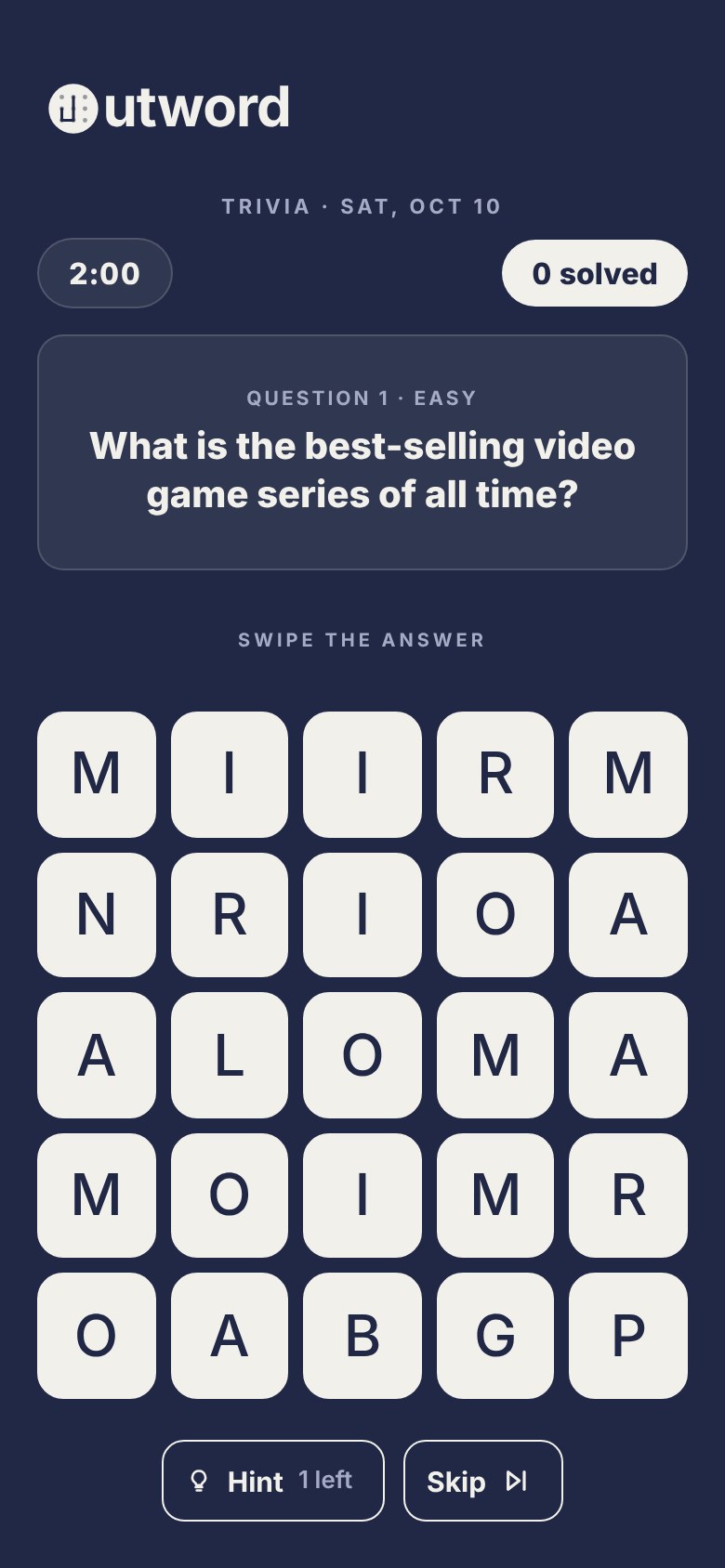
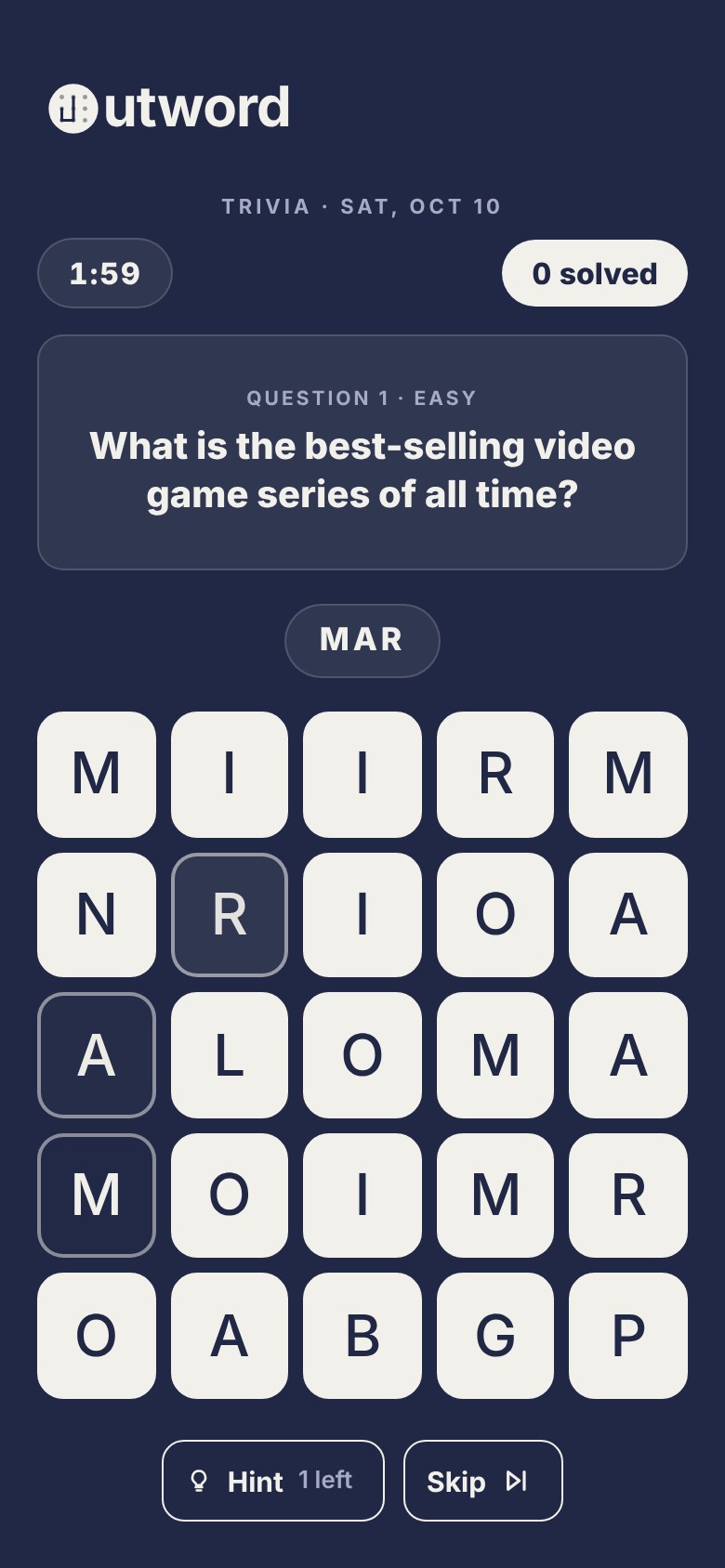
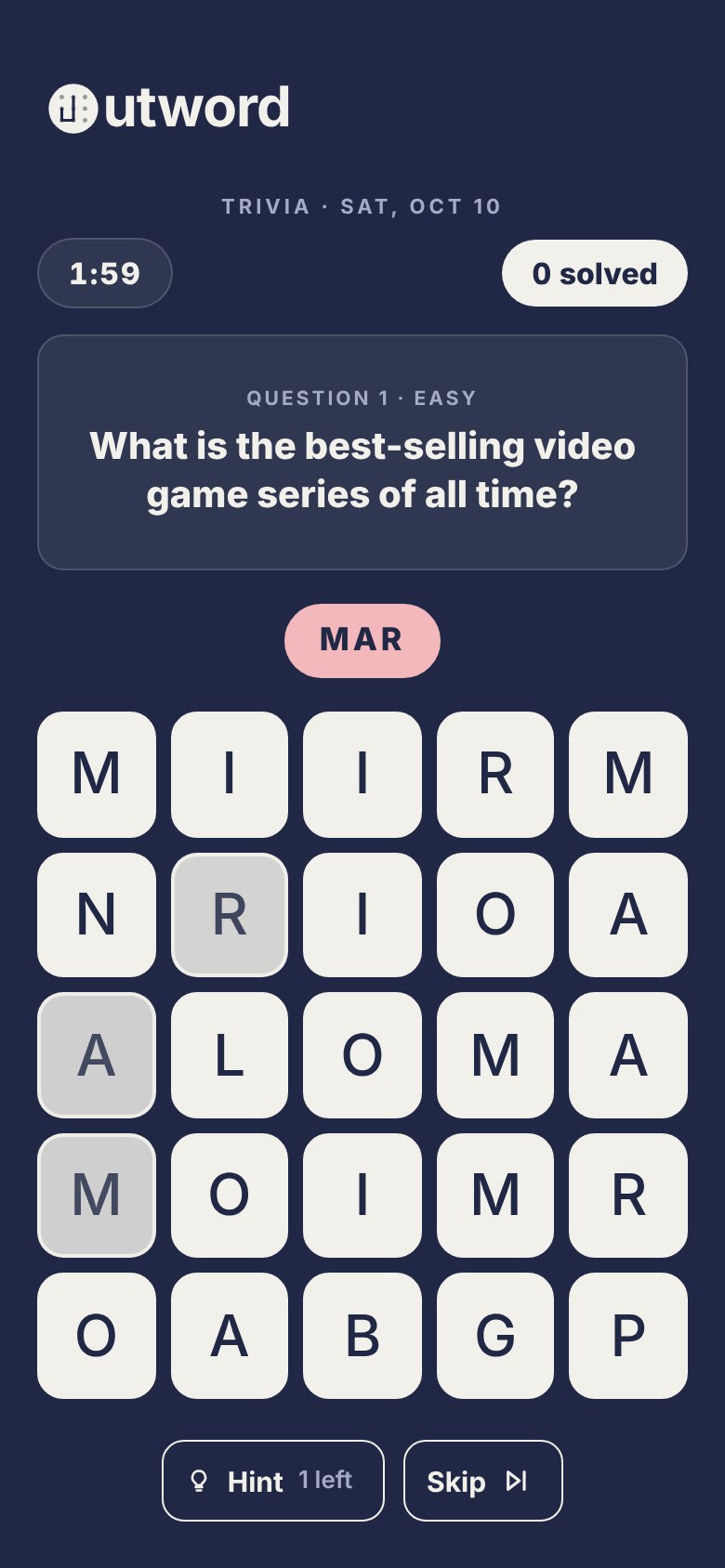
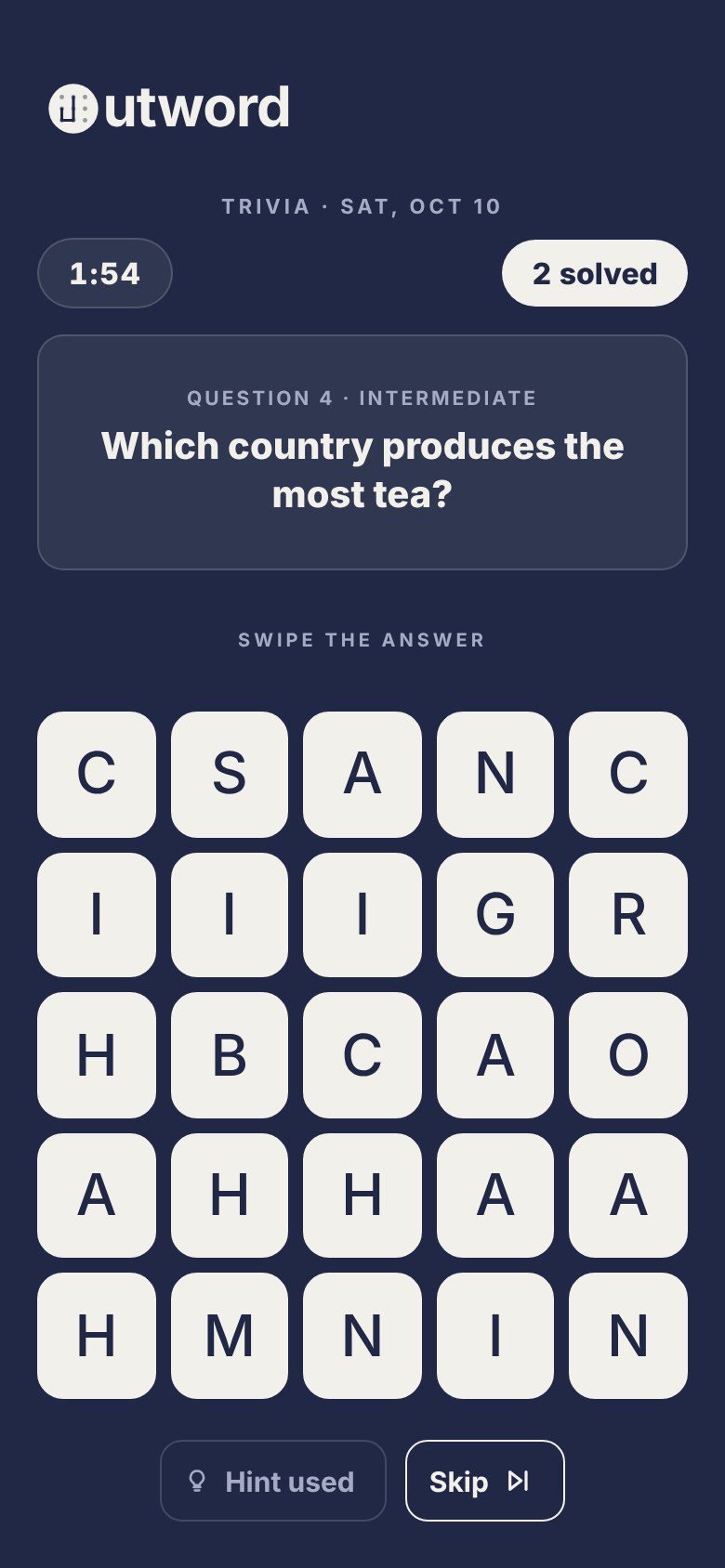
A question on top, its answer hidden on a 5×5 board as a path you swipe. The daily run is 2 minutes, as many questions as you can: solve one and the next is straight up. One hint for the whole game; skip is free. The same pieces as every other board — tiles, the trace, the word pill — so nothing new had to be learned.


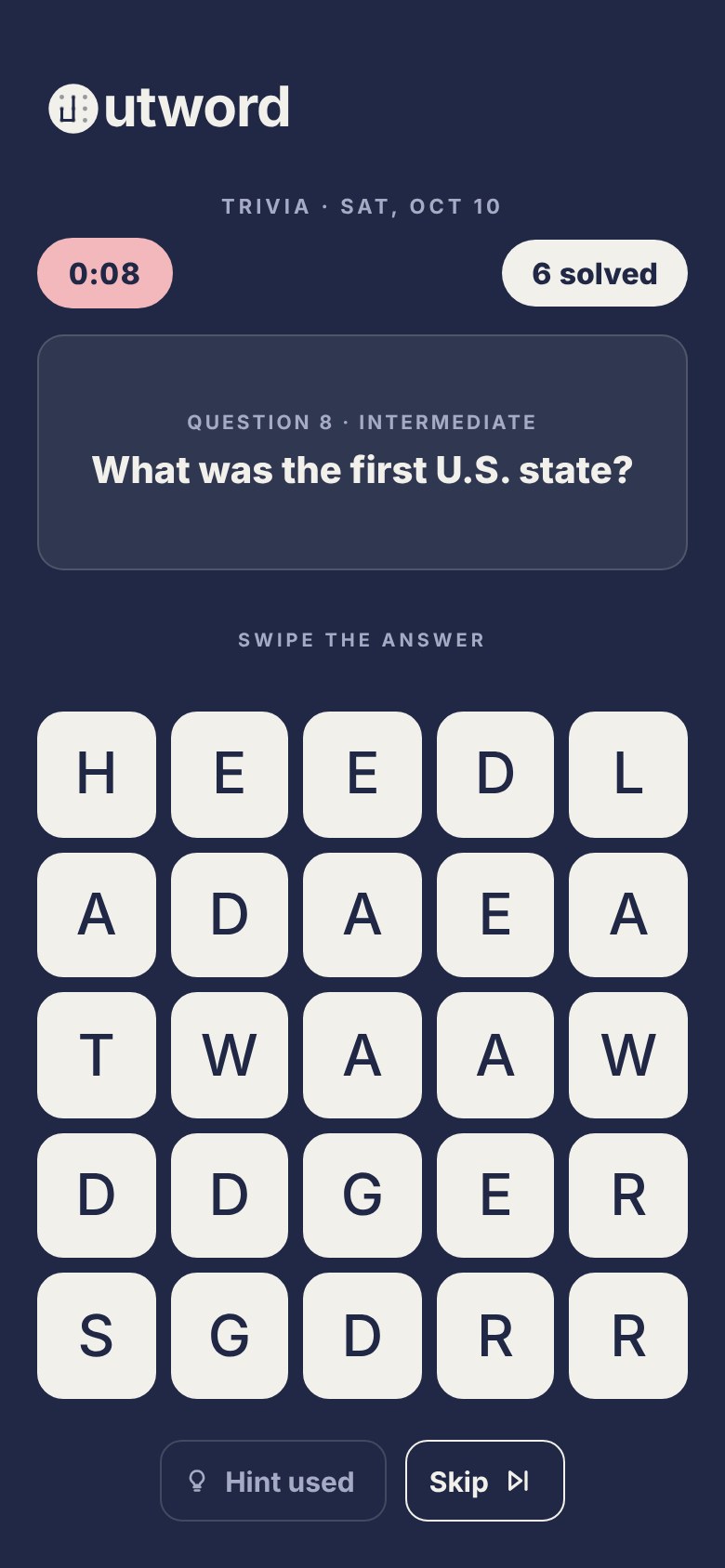
| Part | Spec |
|---|---|
| layout | eyebrow "Trivia · Sat, Oct 10" · HUD: timer pill (left) + "N solved" score pill (right) · question card ("Question N · Easy" + the question, centred) · slot · board · Hint + Skip |
| .tv-qn | 700 10.5px, tracking 1.5px, uppercase, --paper-dim · tiers read Easy / Intermediate / Difficult · in the card: no margin, 6px above the question |
| .tv-q | 800 20px/1.3 (18px under 760px tall), centred, inside the question card: 33px from each screen edge (16 gutter + 1 border + 16 padding) |
| .tv-slot | height 40 · 18px above and below · holds the word pill, or "Swipe the answer" (700 10px, tracking 2px) at rest |
| .tv-acts | 22px under the board · gap 10 · .tv-btn height 44, radius 12, 1.5px --paper outline · Hint shows "1 left", then "Hint used" (outline --tray-line, dim) |
| solve | pill turns --ok-green for 650ms (the one green moment), haptic, then the next question |
| not it | .bad pill (rose fill/line/ink) for 900ms; under 3 letters says nothing (a fumbled tap) |
| swipe | first touch and the lift point take the whole tile; mid-swipe keeps the 70% zone so clipped corners don't grab tiles · the word is read from the live trace on lift |
| countdown | "Get ready…" then 3, 2, 1 (3.8s) before the clock starts, like the daily board |
The question card
Questions run 1 to 4 lines, and anything above the board that changes height moves the board under the player's thumb. So the question sits in a card that keeps one height for the whole run: as tall as the run's longest question. Every question of the run is laid out, hidden, in the card's one grid cell, so the browser measures the height at the player's own width and font size. The label and question sit centred, with equal space above and below. Spare space reads as padding only when it belongs to a surface.
| Part | Spec |
|---|---|
| .tv-qs | one grid cell, every child stacked in it (grid-area: 1 / 1), align-items: center · fill --raise · 1px --rule · radius 14 · padding 14 / 16 · margin-top 14 · under 760px tall: padding 12 / 14, margin-top 8 |
| ghosts | every question in the run, each a label line + the question, visibility: hidden and aria-hidden · the tallest sets the height, so no number is hardcoded |
| content | the visible label + question, centred: equal space above and below |
| behaviour | card, slot, board and buttons hold still across every question in a run, wherever the player has scrolled · a new run can be taller or shorter (its longest question differs) |
| measured | 14 skips at 320 / 375 / 390 / 430 wide: board moved 0px · card height constant · space above and below equal to the pixel |
| rejected | question at the top of the space (3.23.4: a gap under short questions) · at the bottom (3.23.5, preview only: the gap moved under the timer) · the header sliding away for long questions · no reserved space (the original jump) |
The hint tag
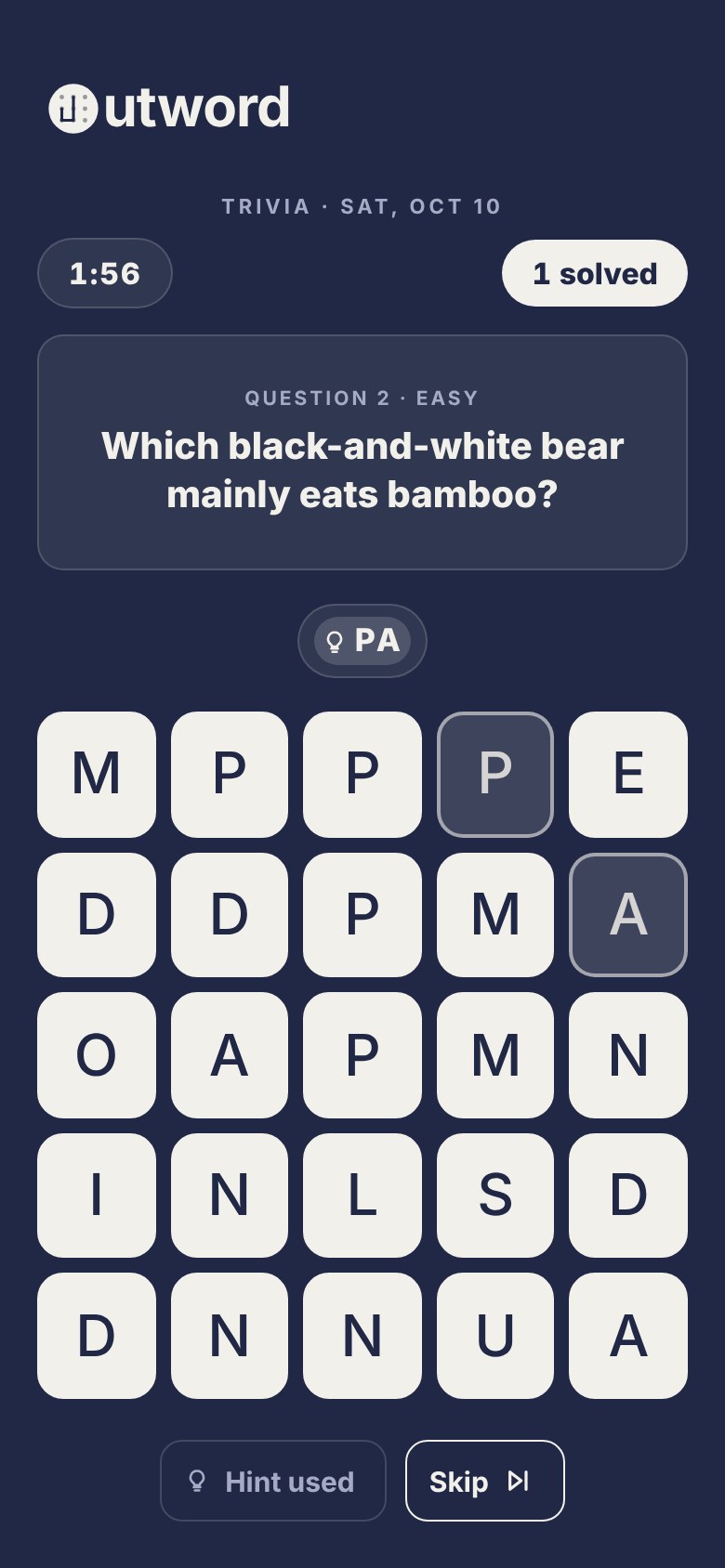
The hint lights the first two path tiles and rides in the pill as a soft filled tag with a bulb. The tag sits tight against the rest of the word so PO·PCORN reads as one word, and it stays through wrong answers and the green solve. With the hint lit, tracing the whole word, starting on the second hint tile, or tracing only what's left all count.
| Part | Spec |
|---|---|
| .tv-chip | fill 16% currentColor (reads on neutral, rose and green) · radius 999 · letter-spacing 2px |
| centring | 6px visible space on every side of bulb + letters (measured at 3×): padding 3.17 / 3.5 / 2.17 / 3.83 — uneven on purpose, the bulb icon carries its own space and caps sit high — plus translateY(-0.33px) on the contents (text snaps to whole pixels; transforms don't) |
| gap | 2px between the tag and the next letter · the tag never shrinks |
End of the run
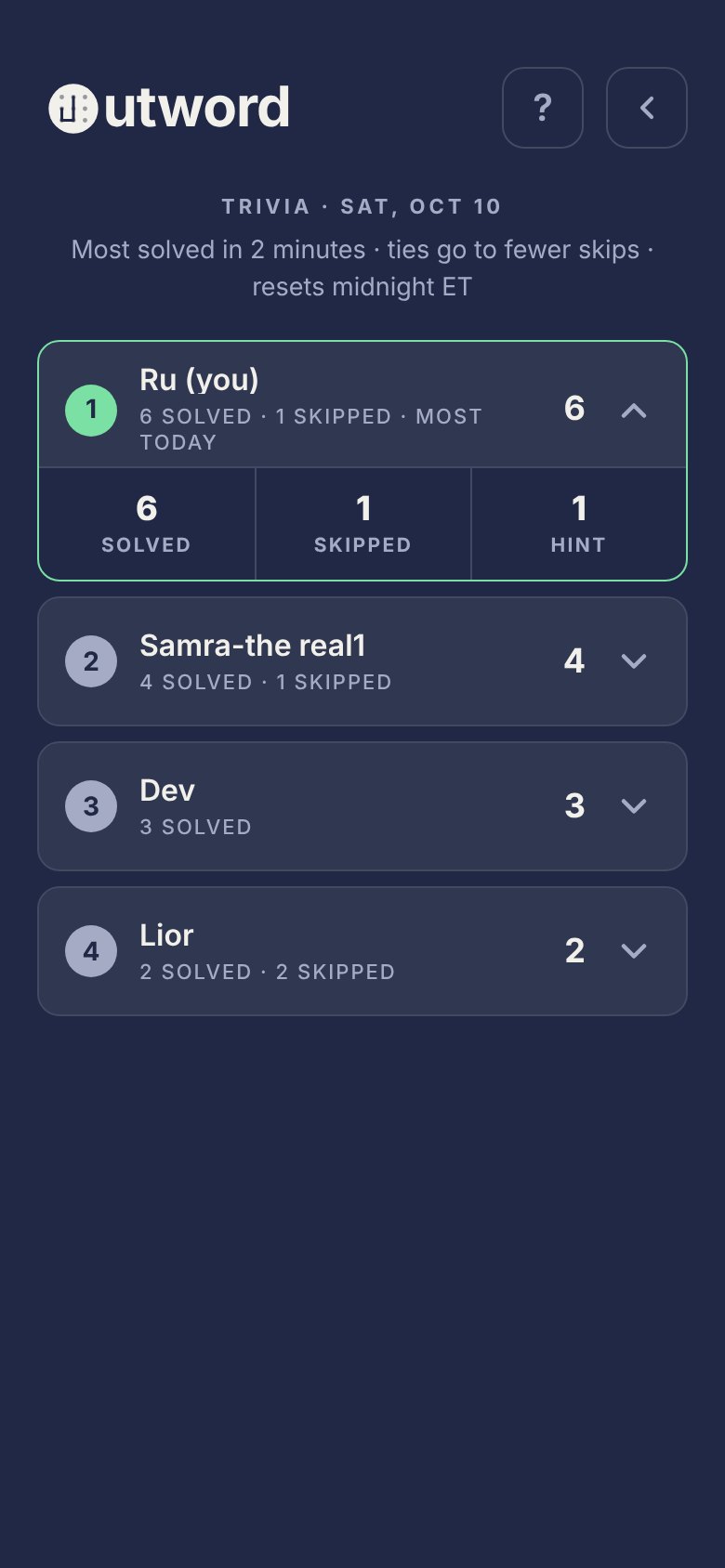
The summary shows the count big, "solved · N skipped · hint used", then every question you met in order: your answer in selected tiles + SOLVED (green), or dashed empty tiles + SKIPPED. If you have the most today the label reads "You solved the most" in green and the podium confetti fires — the only celebration in trivia, and it happens after the round. Otherwise "Solved in 2 minutes". 3.25.5: tap any answer and a sheet shows its question, the answer forming in the word pill, and the board it was on with the answer traced: the daily board leaderboard's small board, pressed tiles and soft trace. Tap the board to play it again; room results open the same sheet with who solved it. The leaderboard ranks most solved, then fewer skips; the leader reads "most today". No lock, no "unlocked".
| Confetti | Spec |
|---|---|
| confetti | 36 pieces from the label: tiles, selected tiles, name tiles spelling the player's name, and trace ribbons · tile colours only, never green · clears on its own · never on Home |
| name tiles | board tiles scaled down: 20px, radius 22%, 500-weight letter at ~52% of the tile (10.5px), --tile / --tile-ink |
| pieces | .cf-tile 12px, radius 22%, --tile · .cf-ring = the selected tile, --select + 1.5px --select-stroke · ribbons = the trace stroke at 62% |
Trivia mode in Play
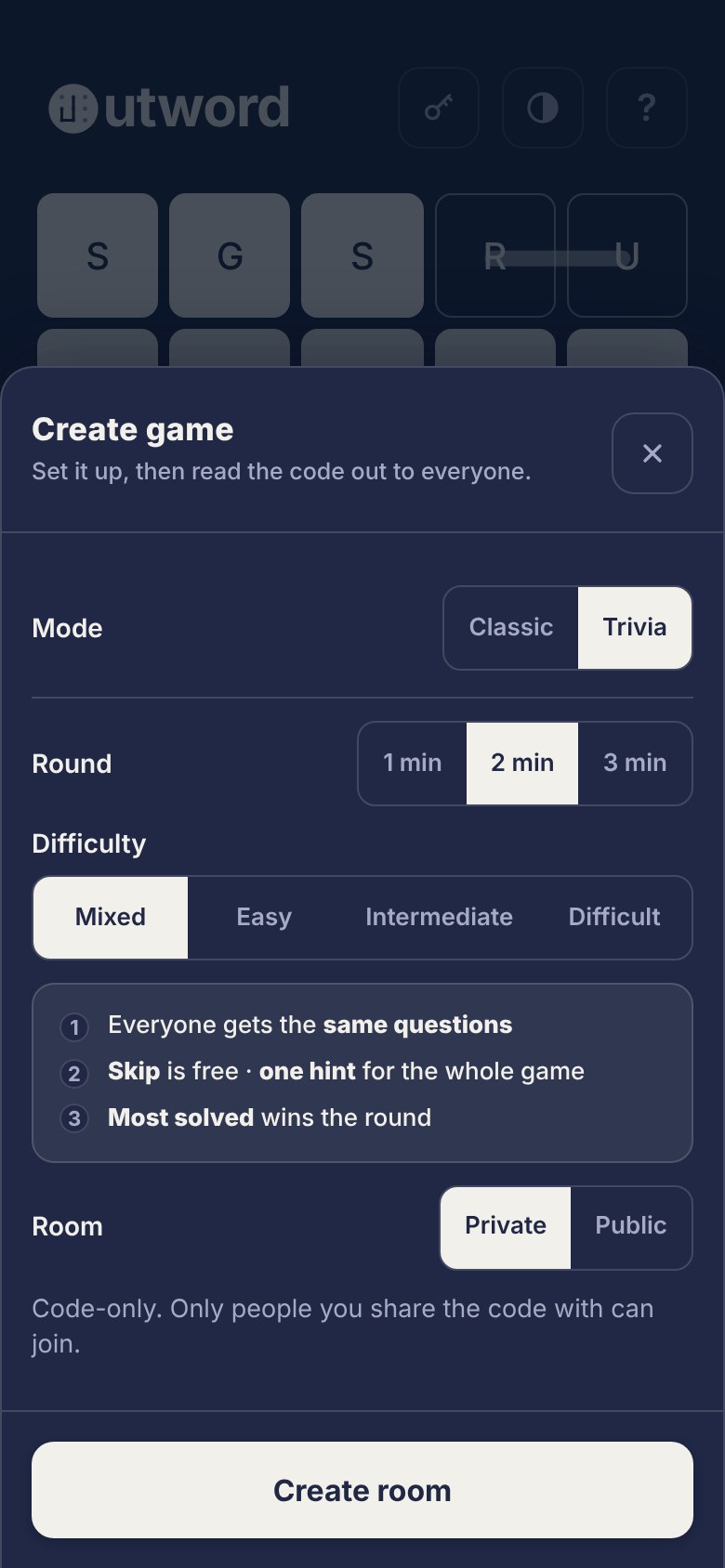
Trivia replaced Survival in Create game and Play solo. Settings: Round 1 / 2 / 3 min and Difficulty Mixed · Easy · Intermediate · Difficult (a full-width segmented control — the selected segment is --fg solid, never the tile treatment). The rules card says it in three lines, including "one hint for the whole game". In rooms everyone gets the same questions in the same order; results show standings (solved, skips) and every question with chips for who solved it (you in green, "nobody" in italic).
20 Patterns
Scoring
Every game scores in small numbers a player can add in their head. Rooms and solo boards rank the people in them; the three daily games also bank points into one monthly total, which is the leaderboard on Home. Points are banked once, when you finish, and never recomputed.
Word points
A word is worth its length minus two, with a floor of one: 3 letters = 1, 4 = 2, then letters − 2 (partyScore). Under 3 letters isn't a word.
| Letters | 3 | 4 | 5 | 6 | 7 | 8 | 9 | 10 |
|---|---|---|---|---|---|---|---|---|
| Points | 1 | 2 | 3 | 4 | 5 | 6 | 7 | 8 |
Each game
| Game | How it scores | How the day ranks | Banks to the month |
|---|---|---|---|
| Daily board · 90 sec · 5×5 | word points for every word you find | total points, then longest word, then more words, then who finished first | your total · typical 40–50 |
| Longest word · 60 sec · 5×5 | your longest word. The goal is the board's headline word, shown as "N letters" on the card and above the board; find a word that long (or longer) and the round ends on the find | whoever reached the goal first sits at the top; then longest word, then faster, then who finished first | 3 per letter of your longest word, +10 if it reached the goal (TOPWORD_PTS_PER_LETTER, UNLOCK_BONUS) · 6 letters = 18 · 9 of 9 = 37 |
| Trivia · 2 min | one per question solved. The hint is free; a skip costs nothing but time | most solved, then fewer skips, then who finished first | 5 per answer (TRIVIA_PTS) · 6 answers = 30 |
| Rooms · 2 or more players | word points for every word, and a word nobody else in the room found counts double (marked ×2) | total points. Survival ranks by how long you lasted, then words, then points | no points; the game counts toward games played, and a win if you place first with points |
| Solo | word points, never doubled: alone, every word would be "unique" | just you | nothing |
The month
Banked points add up across the month on the Compete leaderboard, ranked by points, then words. Only players who played a daily game that month appear. On the 1st the final standings open as the podium, and last month's winner wears the crown until the next 1st.
Your month, by game (3.24.0) and the month board's stats (3.25.0)
Every opened row on the month board says the same things in the same order, about this board's points only. Your own row opens by itself on three cells, the month's points from the Daily board, Longest word and Trivia, each with a swatch in the ink of --fg (Daily solid --fg, Longest --fg-soft, Trivia an outline of --fg since 3.25.3). Then up to five days with points, newest first, one bar each, every part carrying its points (since 3.25.6 a part is never narrower than its number plus 4px a side). Every row then shows the month, "12 of 31 days" and a mark a day (played days filled, today outlined), and the records said in full: Best Daily board, Longest word found first (the open lock stays --earned), Best Trivia run (3.25.1: Longest streak left; the strip shows the runs). Since 3.25.1 the line under the leaderboard's title is a text button, "How points work". Since 3.25.2 its sheet ("Tap a game to see it play.") says each game's rule in one line, and tapping a game plays it on a small board ("3 letters is 1 point, +1 a letter.": TAG +1, GATHER +4, GATHERED +6; "3 points a letter, +10 for the board's longest.": GARDENS climbing to +21, then the lock opening for +10; "5 points a right answer.": two questions, +5 each). Before a tap, and under reduced motion, each board shows how it ends. The Daily board keeps a point a letter, with no unique rule. Words found and Party games won are gone: one mixes two games' words, the other counts rooms, which bank no points here.
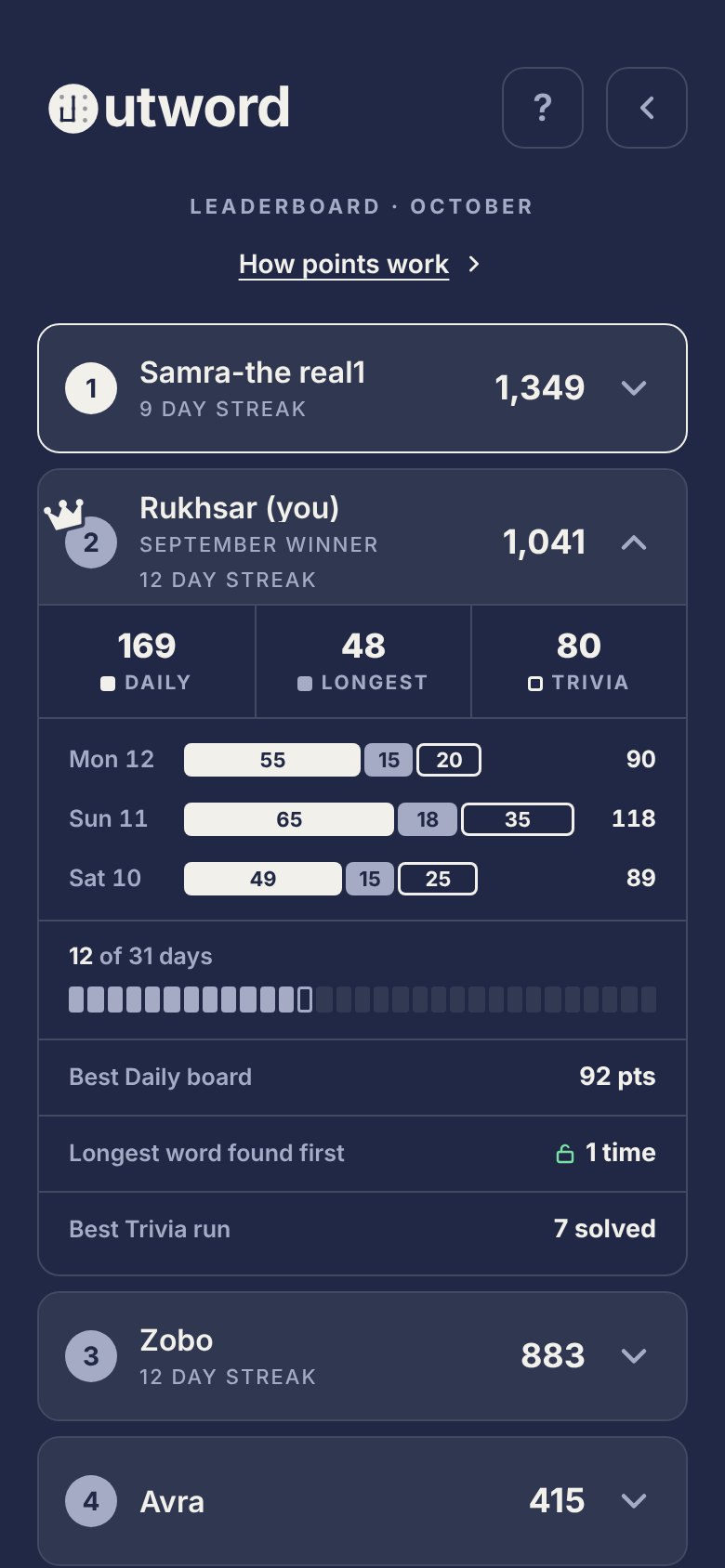
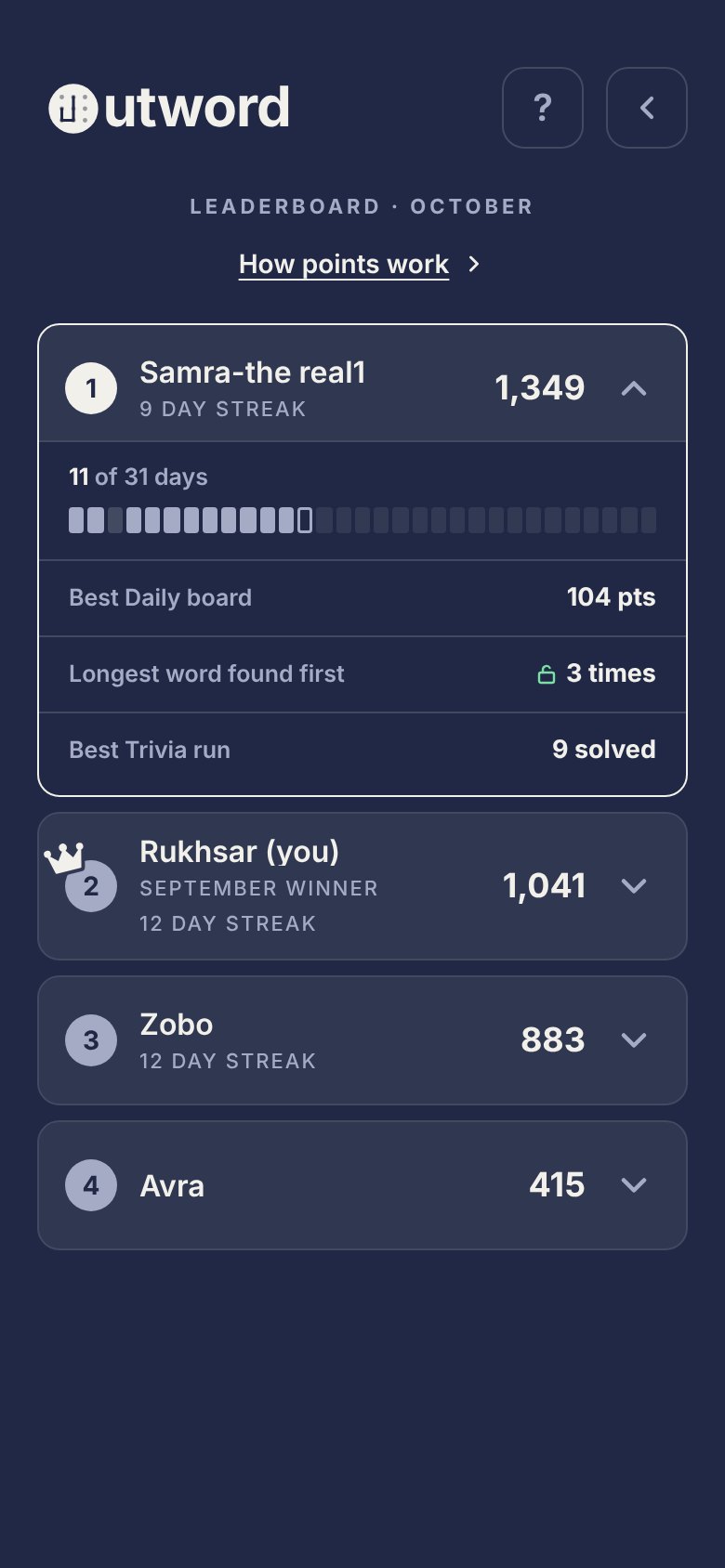
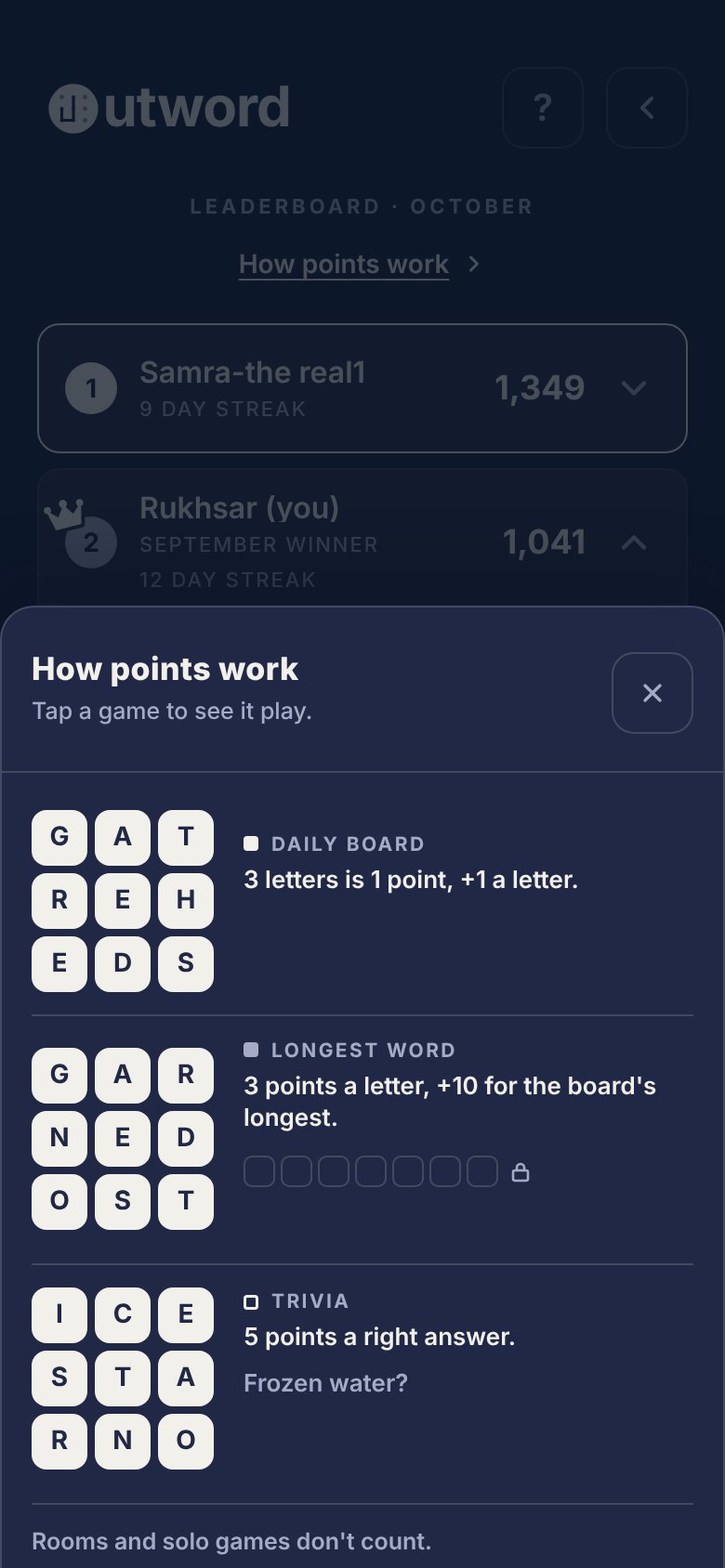
Nothing new is stored: each day is rebuilt from that day's own results with the rules in force since 2026-10-10, and a finished day is kept on the phone, so it's read once. A month that began before 2026-10-10 shows its older points as one earlier cell, so the cells always add up to the row's total.
Worked examples
- Daily board: dealer, dearer, dilate, eaters and ideals are six letters each, 4 points each: 20 points, banked as 20.
- Room: two players both find dealer (4 each); only one finds retailed, 8 letters, 6 points, doubled to 12.
- Longest word: the card says 9 letters. A 7-letter best banks 21. A 9-letter word ends the round and banks 27 + 10 = 37; so does a 10-letter word if you find one (30 + 10 = 40).
- Trivia: 6 solved, 2 skipped, hint used: 30 points. A player with 6 solved and 1 skip ranks above you.
Hints never cost points. Skips only break ties, never subtract. Count in fives and threes so a rule fits on a card. Rule changes apply from the day they ship; banked points stay as scored (3.23.2 applies from 2026-10-10; 3.23.7's Longest word goal from 2026-10-12).
21 Patterns
Question bank & rotation
197 questions in three scopes: the original 96 shared by daily and rooms, 50 daily-only and 51 room-only. Questions come only from Ru's own lists, filtered to one-word answers, no numbers, kid-safe and clear (see trivia/question-requirements.md).
| Where | How |
|---|---|
| Daily | same for everyone, so it can't use your history. Each level walks a fixed shuffle and steps forward daily by what a strong run uses (Easy 2, Intermediate 6, Difficult 8). Today and tomorrow never overlap; a question returns only after its level has gone round |
| Trivia mode | each phone counts every question it has met (ow_tq_counts). Unseen first, then least-seen; a question met 3 times waits until fewer than 8 in its level remain under the cap, then the level starts over. Rooms: the host deals from their counts and the list rides on the room (tseq) |
| order in a run | Mixed climbs: questions 1–2 Easy, 3–5 Intermediate, then mostly Difficult with every third Intermediate |
| adding | new questions append to the bank (existing refs never move) and join both rotations automatically |
22 Standards
The rules, short
- Never hardcode a color — always a token, so it survives a mode flip.
- Type on --earned / --danger fills is --ground. Never white or black.
- Green means positive; rose means negative. One meaning each.
- Green never marks a selection. A shown or traced word, and its active pill, use the pressed-tile state.
- An earned/danger element carries the hue on fill and border — never a coloured fill with a neutral --rule stroke.
- Pills are for one live value. Recaps use weight and ink — not pills, not green.
- One primary per screen; everything else is an outline. No third style.
- Icon buttons are 44×44 / radius 12 / --fg-soft — modal close included, no exceptions.
- Three elevation levels: ground, raise, lit. Depth from the tile lip, not shadows.
- Radius: 12 (most), 999 (pills), 14 (tiles). Past these only with a reason.
- Tiles never press-dip. Trace hidden on the game board; name board excepted.
- Respect prefers-reduced-motion on anything that moves.
- The crown means one thing: won last month. Never decoration, never during a round.
- 1st, 2nd and 3rd are solid, traced and lit tiles. Never gold, silver and bronze.
- A code is shown as tiles and copied by tapping it. Text buttons never carry icons.
- One ask per visit, only on Home, never mid-round. "Not now" is respected.
- Every save path has a fallback, and the long code always still works.
- The update reel uses the app's real pieces, names exactly what's new, and closes quietly.
- Size motion to the moment: small for common, a story only for rare.
23 Standards
Do & don't
The rules above, shown. Each pair is a real component rendered right and wrong — the reason matters more than the rule, because it's what lets you judge the cases this doc doesn't cover.
--rule stroke reads as a mistake up close and mutes the signal.24 Standards
Accessibility
Target: WCAG 2.1 AA — 4.5:1 for body text, 3:1 for large text (≥24px, or ≥19px bold) and non-text UI. Measured from the tokens, not asserted; the failures are disclosed below, not hidden.
| Pair | Dark | Light | Target |
|---|---|---|---|
| --fg on --ground | 12.70 ✓ | 12.70 ✓ | 4.5 body |
| --fg-soft on --ground | 6.36 ✓ | 4.78 ✓ | 4.5 body |
| --fg-faint on --ground | 3.19 ✕ | 2.29 ✕ | 4.5 body |
| --fg-faint on --raise | 2.55 ✕ | 2.48 ✕ | 4.5 body |
| --fg-soft on --raise | 5.07 ✓ | 5.17 ✓ | 4.5 body |
| --ground on --earned | 8.98 ✓ | 5.71 ✓ | 4.5 body |
| --ground on --danger | 8.52 ✓ | 7.54 ✓ | 4.5 body |
| --focus vs --ground | 5.27 ✓ | 5.38 ✓ | 3.0 non-text |
| --rule vs --ground | 1.65 — | 1.30 — | 3.0 non-text |
--fg-faint is the faintest tertiary ink (fig captions, hints like "tap word to show on board"). It does not meet 4.5:1 in either mode, and in light mode misses even the 3:1 large-text floor. It's a real gap, flagged not buried — the fix is to darken --dk-fg-faint / --lt-fg-faint until both clear 4.5:1, then re-verify. --rule (hairlines) sits below 3:1 by design — decorative, never load-bearing, and marked "—" not "✕".
- Hit targets — 44px on every interactive element, the modal close included. No exceptions.
- Focus — always-visible
:focus-visiblering, 2px --gold (=--fg), offset 2px; the home/mode icon button rings in --focus. Passes 3:1 non-text (5.3:1). - Keyboard & AT — known gap. Spelling a word is a pointer-driven swipe across tiles; there is no keyboard or assistive-tech path to trace a word today. It's a real limitation for a swipe-native game, disclosed here rather than omitted; a keyboard model (arrow-to-move, space-to-select) is the open item.
- Reduced motion — honored throughout; the mark and tiles hold still under
prefers-reduced-motion. - Live numbers — tabular-nums so they don't shift width as they tick.
25 Standards
Voice & content
Plain verbs, sentence case, active voice. A control says what happens and keeps the same name through the flow. Errors don't apologise and name the fix; empty states invite the next step rather than set a mood. The shipped examples live in System states.
| Instead of | Outword says |
|---|---|
| "Error: room capacity exceeded" | That room is full. 12 players max. |
| "Submit" | Create game |
| "No data" | Nobody's scored yet this month |
| "Network error" | No connection. Playing solo works anyway… |
| "Invalid input" | Room codes are 4 letters. |
The product currently mixes game and room: the button reads "Create game," its confirm reads "Create room," and errors use both ("That game already started" · "That room is full"). That breaks the rule above. Pick one mapping — room for the shared space, game for a single round — and use it end to end. This is a product fix, flagged here so the doc doesn't paper over it.
26 System
Governance
The system has one owner and one source of truth. That's not a limitation of being small — it's the thing that keeps two years of changes from turning into a pile of one-off exceptions.
- Source of truth
app.jsxat its currentAPP_VERSION. This document is generated from it; where they disagree, the code wins and the doc is the bug. The builtapp.jsis output — never edited by hand except for a verified one-value string change.- Add vs. reuse
- Reuse first. A pattern earns a component only once it appears in roughly three places; before that it stays local. A new token or component needs a name, a one-line reason, and an entry here — no silent additions.
- Naming
- Tokens are semantic, not literal —
--earned, not--green;--ground, not--navy. The name says the job, so the value can change without the name lying. - Versioning
- Minor for features, patch for fixes. Every release bumps four things together —
APP_VERSION,app.js?v=,sw.jsVERSION, andCHANGELOG.md— or the service worker serves a stale shell and the change never ships. The design system's version moves with them (this page's badge, the README title, the spec's source line), andnpm run checkstops the release until all of them match. - Deprecation
- Nothing is deleted out from under a caller. Old names resolve to canonical through the alias layer and are marked "don't add new ones"; superseded artifacts are labelled stale rather than removed until nothing points at them. The old root
design-system.htmlwent in 3.23.6, once nothing did. - Review
- One change per release, and a visual mock is approved before any UI code is written. Unrelated changes never ride along unflagged.
Recent changes
- 3.25.7
- One round, one clock: in a room, a phone that sees the start late joins the round in progress and ends with everyone; a phone still playing when the tally is out stops.
- 3.25.6
- Every part of the month bars shows its points: a part is never narrower than its number plus 4px a side. Before, a thin part left its number off, so on a 375-wide phone Longest word's points were missing on most days.
- 3.25.5
- Trivia answers open their question: tap an answer on the summary or in room results and it replays on the board it was on, with the daily board leaderboard's board and trace.
- 3.25.4
- Coming back with a code: Paste under the code tiles, and the field over them is see-through instead of invisible; I have a code skips the tutorial. A sheet with no foot clears the home indicator, and sheets sit on top of a keyboard. The code tiles are 38px under 360px.
- 3.25.3
- Trivia's part of the month bars is an outline of
--fg, not--fg-faint: the three games are easier to tell apart, and its numbers read at 12.7:1. How points work starts empty. - 3.25.2
- How points work, said once and shown: each game says its rule in one line, and tapping a game plays it on a small board with the points it earns; before a tap, and under reduced motion, each board shows how it ends. The Daily board keeps a point a letter after Boggle's and Word Hunt's scoring were weighed; a score stays final when you finish.
- 3.25.1
- October's "+744 from Oct 1–9" note is gone, to cut noise. How points work: a text button under the leaderboard's title, in place of "Points add up from every Compete board.", opens the three games' rules with an example each, written from the scoring constants. Longest streak leaves the records.
- 3.25.0
- Stats on the month board: every opened row says the same things in order. Your row: the games, October's note in place of the "earlier" cell, your last days with each part's points on its bar. Every row: the month as a mark a day, then Best Daily board, Longest word found first, Best Trivia run (new) and Longest streak. Words found and Party games won are cut. A streak under a name ends when a day is missed.
- 3.24.0
- Your month, by game: your own row on the month board opens on the month's points from each game and your last five days as bars, split in the inks of
--fg; tap a day for its numbers. Rebuilt from each day's results, nothing new stored. Home's half cards fit 320px screens: smaller slots and place under 360px. - 3.23.7
- Longest word has one goal from start to finish: the board's headline word, the length on the card and above the board. Any word that long or longer wins and banks the +10; the win used to be judged against the full dictionary's longest word, a rare word on about half of days. Scoring is written down in full (word points, rooms, each daily game, the month, worked examples).
- 3.23.6
- Trivia question card: the question sits centred in a fixed-size card (
--raise,--rule, 14px corners) as tall as the run's longest question, so the board never moves between questions. The design system moved into the repo (design-system/):css/andtrivia/are generated fromapp.jsxand checked on every release, and the stale rootdesign-system.htmlwas removed. Seeaudits/. - 3.23.4–5
- 3.23.4 reserved the question's space with the question at the top (a gap under short questions); 3.23.5, preview only, put it at the bottom (the gap moved under the timer). Both replaced by the card.
- 3.23.3
- Hint tag centred (6px every side) with a 2px gap to the word. Confetti name tiles are board tiles scaled down. Question rotation: Trivia mode caps repeats at 3 per phone; the daily walks the whole bank.
- 3.23.2
- Home trivia card shows your place today (option K), not a lock. Scoring rebalanced: Longest 3 per letter +10, Trivia 5 per answer. Swipe reads the live trace; whole-tile first touch and lift. Daily trivia: same questions for everyone, countdown, "You solved the most".
- 3.23
- Trivia becomes an unlimited 2-minute run (one hint, free skips, most solved). Trivia mode replaces Survival in Play, with a difficulty toggle. Compete card arrows top-right.
- 3.22
- Home refresh: the Compete bento (leaderboard row, Daily board, Longest + Trivia). Daily trivia. The update reel becomes a story on real screens, exported from the canvas. Podium confetti at the earned moment.
- 3.21.1
- Green never marks a selection. A word shown on a review board (the longest-on-board word included) lights in the pressed-tile state with the normal trace, and active word pills flip like a pressed tile. The update reel is keyed to
REEL_VERSIONso patches never replay it. - 3.21
- Short recovery codes (six characters as tiles, Save to Photos or Notes, fallbacks for every path), the save nudges (outlined key with a dot, Keep your spot, home-screen guide, Played before?), the update reel format, and the first motion vocabulary. Then formalised: motion principles, eleven motion rules, a reduced-motion table and a live motion lab; the update reel template (open, chapters of four beats, recap close), its chapter spec, copy template and pre-ship checklist.
- 3.20
- Monthly podium on the 1st (solid, traced, lit columns; the crown drops on 1st; trace-ribbon confetti for everyone, tuned per viewer) and the crown all month on last month's winner. New token
--raise-solid. - 3.18
- Recovery codes (readable word-word-id, view/restore sheet reached from the header key icon). The help sheet stays two sections — Playing, Competing.
- 3.14.6
- Brand-mark motion → curated rotation of twelve legal traces (was four).
- 3.14.1
- Name-board letters recede, so its trace line stays visible while the game board's is hidden.
- 3.12
- Game-board trace line hidden — filled tiles carry the word; feedback moved to the pill.
27 System
Deliberately omitted
What the system refuses to build is as load-bearing as what it does. Each omission traces to a principle; adding any of these would cost more in clarity than it returns.
- Nothemes beyond the two groundsLight and dark already cover it. A third theme is surface area with no job — and every extra theme is another set of contrast pairs to keep honest. (Principle 3, 4)
- Noshadow / elevation stackDepth comes from the tile's inset lip and three flat surface levels — ground, raise, lit. Stacked shadows would add rendering cost and visual noise for a hierarchy that's already legible. (Principle 3, 4)
- Nofourth hueTwo semantic hues (earned, danger) plus one system hue (focus) is the whole palette. A genuinely new hue would start diluting meaning and break "one hue, one meaning." (Principle 2, 4)
- Nogold, silver or bronzeThe top three are told apart by the board's own tile states (solid, traced, lit), not by three metal colors that would each be a new hue with one job. (Principle 2)
- Noicon libraryA handful of 20px stroked glyphs, drawn to one spec. More icons means more to misread and more to keep consistent, for a game that needs almost none. (Principle 4)
- Nocomponent-count targetA small, opinionated set beats a large generic one. Growth is demand-driven (the rule of three), never a roadmap goal. (Principle 4)
- Noanimated mode switchChanging mode is a quiet 0.5s cross-fade, not a moment. Celebrating it would contradict low stimulation. (Principle 3)
Like the systems it's modelled on, this one isn't a reason to make every screen identical, and it isn't a substitute for product thinking. It removes the small decisions so the real ones get the attention.
28 System
Reference
Each active role resolves, per mode, to a value in the base tier (--dk-* / --lt-*) — the only hardcoded hexes in the system. The table shows those resolved values: 29 roles × 2 modes = 58 base literals. Components reference the active role, never a literal. Only colour is tokenised; durations, spacing and radii are raw constants (see those sections). Legacy aliases resolve to canonical in one place, so nothing breaks — prefer canonical names in new work.
| Token | Dark | Light | Role |
|---|---|---|---|
| --ground | #202845 | #F2F0EA | the page |
| --raise | fg .08 | #FAF9F6 | cards, fields, rows |
| --raise-solid | #313852 | #FAF9F6 | opaque twin of --raise · the crown's halo (3.20) |
| --fg | #F2F0EA | #202845 | primary text / fill |
| --fg-soft | #A5ABC4 | #5F6987 | secondary text |
| --fg-faint | #6C7597 | #98A0B8 | tertiary text |
| --rule | fg .17 | ink .14 | hairlines, outlines |
| --rule-strong | fg .32 | ink .30 | emphasised borders |
| --tile | #F2F0EA | #202845 | resting tile face |
| --tile-ink | #202845 | #F2F0EA | letter on resting tile |
| --die-edge | #7E828F | #9496A0 | tile edge detail |
| --select | #202845 | #F2F0EA | selected tile fill |
| --select-ink | #F2F0EA | #202845 | letter on selected tile |
| --select-stroke | fg .5 | ink .5 | selected tile border |
| --lit | #3D445C | #D5D4D3 | lit surface (non-tile) |
| --lit-ink | #F2F0EA | #202845 | ink on lit surface |
| --lit-edge | #2D354F | #E5E3E0 | lit edge detail |
| --trace | #F2F0EA | #202845 | connecting trace line |
| --earned | #7BE0A3 | #276A43 | positive — valid / win |
| --danger | #F2B8BC | #8E2430 | negative — invalid / error |
| --focus | #7E9BE0 | #2F58D0 | focus ring |
| --earned-wash | earned .12 | earned .10 | green tint bg |
| --danger-wash | danger .14 | danger .10 | rose tint bg |
| --earned-card-bg | earned .06 | #E6EEE3 | earned card fill |
| --earned-card-border | earned .45 | #9FC2A9 | earned card border |
| --mark-dot | #9698A0 | #686D7D | brand-mark lattice dots |
| --shadow | #0A0E22 .38 | ink .16 | drop shadow |
| --shadow-lift | #0A0E22 .28 | ink .20 | button lift shadow |
| --scrim | #0A0E22 .72 | ink .55 | modal scrim |
--tray→--ground · --tray-raise→--raise · --tray-line→--rule · --die→--tile · --ink→--tile-ink · --paper→--fg · --paper-dim→--fg-soft · --gold→--fg · --ok-green→--earned · --bad-fill→--danger · --cta→--fg · --urgent→--danger · --error-surface→--danger-wash · --error-border→--danger · --error-text→--danger · --valid→--fg