Sheet
The app's one modal. A panel rises from the bottom, where thumbs already are, over a dimmed page, and closes with its X or a tap on the dim.
Usage
Use a sheet for a step that interrupts Home and then returns to it: Join a game, Create game, Play solo, Game settings, Your code, Bring back your account, Add Outword to your home screen, last month's podium, and the tutorial. A trivia answer, replayed from its summary, is a sheet too (3.25.5).
Don't open a sheet during a live round. The clock keeps running behind a sheet, which is why the header's help button is hidden while a round is live: offering help mid-game is a trap, where you either lose seconds or learn nothing. Sheets that open on their own never appear mid-round either.
Don't use a sheet to confirm. Taking a player out or making a new room code asks in place, in the row or button that started it: no modal, no layout shift. See Button.
One ask per visit. Anything that opens on its own (the podium sheet on the 1st, the update reel, the Keep your spot sheet) opens only on Home, never over another sheet, and at most one per visit. On the 1st the podium goes first and everything else waits.
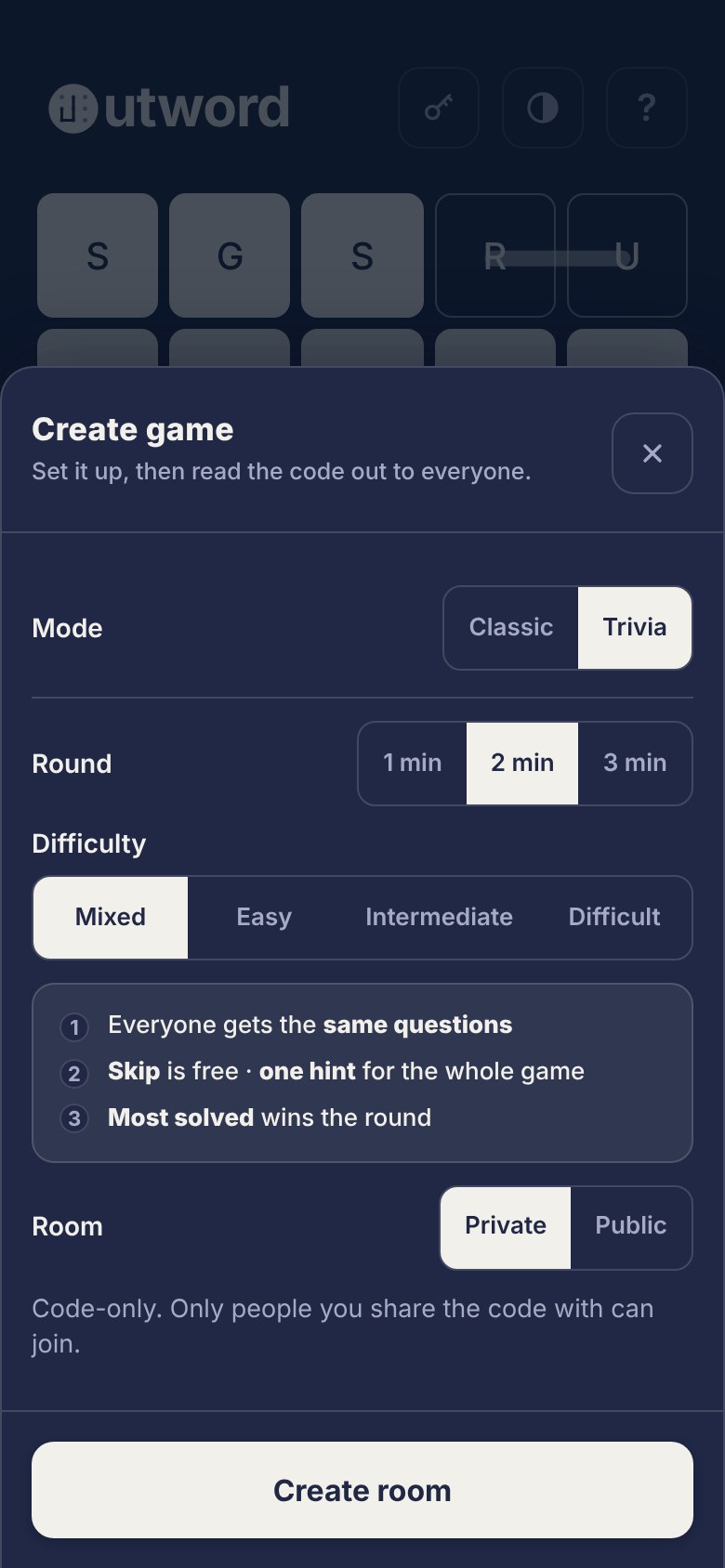
Anatomy
| Part | Spec | Token |
|---|---|---|
| Scrim | .scrim: fixed over the whole screen, z-index 60; holds the sheet at the bottom, centred, and on top of a keyboard while one is up (padding-bottom: var(--kb)); fades in over 160ms | rgba(6,16,32,0.72), hardcoded (see Known issues) |
| Panel | .modal: full width up to 520px, at most 88vh tall (less the keyboard while one is up), top corners 18px, no bottom edge, shadow 0 -8px 40px; rises over 220ms on cubic-bezier(0.22, 1, 0.36, 1) | --ground fill, 1px --rule, --shadow |
| Head | .modal-head: padding 24px 16px 20px, 12px gap, a rule under it | --rule |
| Title | .modal-title: 800 17px, +0.2px | --fg |
| Sub | .modal-sub: 500 12.5px / 1.45, 4px under the title | --fg-soft |
| Close | .modal-x: 44×44, radius 12, 1px edge, 16px X | --rule, --fg-soft |
| Body | .modal-body: padding 16px 16px 4px; scrolls on its own. With no foot it's the last part, and its bottom adds the home-indicator inset (3.25.4) | |
| Foot | .modal-foot, optional: padding 16px at the top and sides; at the bottom, 16px or the home-indicator inset plus 8px, whichever is larger (the inset drops out while a keyboard covers it); a rule above it | --rule |
Code: <Sheet title sub onClose foot>. The tutorial uses the same .scrim and .modal with its own padding (.hs-modal).
States
| State | What the player sees |
|---|---|
| Opening | the dim fades in (160ms) as the panel rises from below the screen (220ms) |
| Open | the page behind is dimmed and doesn't scroll; the body scrolls if the content is taller than 88vh |
| Busy | the sheet's primary says what's happening and disables: "Rolling…" while a room is made, "Looking…" while a code is checked |
| Error | a rose message in the body, under the field it's about (see Field) |
| First-run tutorial | one way out, "Skip", in place of the X |
| Closed | gone at once; the page is back where it was |
Behaviour
- Three ways out: the X, a tap anywhere on the dim, and Escape on a keyboard. A tap inside the panel never reaches the dim.
- The page behind holds still. The body is pinned with
position: fixedwhile a sheet is open, because iOS Safari ignoresoverflow: hiddenon the body. The scroll offset is saved and restored on close, so the page doesn't jump to the top. - Nothing sits under the home indicator or the keyboard (3.25.4). A sheet with no foot ends on its body, which clears the home indicator the way the foot does. While a keyboard is up, the app reads its height from the visual viewport (
--kb, under 80px counts as none) and the sheet sits on top of it, its bottom inset dropping out because the keyboard already covers that strip. Where the keyboard shrinks the page itself,--kbstays 0. - Sheets hug their content, up to 88vh; past that the body scrolls inside the panel. The tutorial is the one exception: in its card deck it keeps a 62vh floor, because it swipes between measured cards and mustn't resize under a thumb.
- No action button when there's nothing to do. The podium has only its X and the dim.
- The update reel is the one overlay that doesn't close on a tap outside. It takes the full screen on a solid ground, and Close at the end is the way out (Escape on a keyboard).
- Reduced motion: the dim and the panel appear without fading or rising.
Accessibility
| Pair | Dark | Light |
|---|---|---|
--fg-soft on --groundthe sub line on the panel | 6.36AA | 4.78AA |
- Role: the panel is
role="dialog"witharia-modal="true", labelled by its title. - Close is a 44×44 button labelled "Close". In the tutorial's deck a second button, "Back to contents", returns to the list.
- Keyboard: Escape closes every sheet.
- Focus isn't managed. Nothing moves focus into the sheet on open (except a field with
autoFocus), keeps it inside, or returns it on close. See Known issues.
Content
- The title names the task, in sentence case: "Join a game", "Your code", "Bring back your account", "Keep your spot".
- The sub is one line that says what to do or why it matters: "Your host reads out a code, put it in here.", "Just you and a board. Nothing is saved.", "Safari can forget your scores. The app won't."
- The foot holds one primary that names the result: "Join", "Create room", "Start trivia", "Update settings".
- A soft way out is a text link, not a second button: "Not now", "I already have a code".
Why it's built this way
Known issues and gaps
- The dim doesn't follow light mode.
.scrimhardcodesrgba(6,16,32,0.72), and the spec copies that literal, while the--scrimtoken (rgba(32,40,69,.55)in light) is never used. Fix:background: var(--scrim), or delete the token if a dark overlay in both modes is the intent, and say so. Planned for 3.23.7 (3.23.6 audit). - The head rhythm is documented wrong. The spec and a CSS comment say 20 above the title, 4 to the sub, 16 to the rule and 12 under it. Since 3.9.1 the code is 24, 4, 20 and 16.
- The spec still calls the close a 36px exception.
.modal-xis 44×44. - The tutorial ends 8px lower than every other sheet on phones with a home indicator. 3.9.1 gave it the same bottom padding as
.modal-foot;.modal-foothas since gained 8px over the inset and the tutorial hasn't. - No focus management: no focus moved in on open, no trap, no return on close.
- The update reel's full-screen ground is a hardcoded
#202845, so it stays dark in light mode. - The Game settings sub still has an em dash before "no new code", though 3.8.0 swept them out of the shipped copy.
Related
- Button: the close, the foot's primary and confirming in place
- Field: what most sheets ask for
- Segmented toggle: the settings in Create game
- Celebration: the podium sheet on the 1st
- Recovery: the code sheets
Changelog
| Version | Change |
|---|---|
| 3.25.4 | A sheet with no foot clears the home indicator; while a keyboard is up, sheets sit on top of it (--kb) and give up the inset |
| 3.22.2 | The update reel takes the full screen on a solid ground; tapping outside no longer closes it |
| 3.21.0 | Sheets that open on their own: one per visit, only on Home, never mid-round |
| 3.20.0 | The podium opens as a sheet on the 1st; no action button, the X and the dim close it |
| 3.9.1 | Head padding 24 / 16 / 20 and body top 16; the tutorial's bottom matches the other sheets |
| 3.9.0 | The head's spacing steps in multiples of 4 |
| 3.8.0 | Sheets hug their content up to 88vh; the 62vh floor goes |